

Description
Stop paying per-ticket fees. Own your entire ticketing workflow inside WordPress.
Event Tickets with Ticket Scanner turns any WooCommerce product into a scannable event ticket — complete with QR code, downloadable PDF, and a built-in mobile ticket scanner for your team at the door.
Unlike platforms like Eventbrite or Ticketmaster, you keep 100% of your revenue. Unlike other WordPress plugins, you get a visual seating plan designer and a ticket PDF designer included — not as expensive add-ons.
Used by 1,000+ event organizers worldwide — from small community events to large concert venues. Rated ⭐ 4.9/5 on WordPress.org.
Who is this for?
- Concert & festival organizers — sell general admission or assigned seats with interactive seat selection
- Theaters & venues — design your seating layout with drag & drop, let customers pick their seats
- Sports events & arenas — handle high volumes with offline fallback and team scanner access
- Clubs, spas, gyms & theme parks — sell multi-entry passes, family tickets, or memberships with expiration
- Community events & fundraisers — get started in minutes with the free version
How it works — 3 steps
- Install the plugin and create a ticket list under “Event Tickets”
- Enable “Ticket Sales” on any WooCommerce product
- Customers receive a unique QR code ticket — scan and redeem at the entrance
That’s it. No coding required. Watch the quickstart video
🎨 Visual Seating Plan Designer
Create professional venue layouts without any design tools:
- Drag & drop seats, shapes, labels, and text onto your canvas
- Upload venue floor plans as background images
- Rotate, duplicate, and bulk-edit elements
- Color-code seat categories and pricing tiers
- Customers see a real-time interactive seat map during checkout
- Seats are automatically blocked during checkout and released on cancel/refund
🎟️ Ticket PDF Designer
Design tickets that match your brand — not generic templates:
- Add your logo, custom colors, header and background images
- Position QR codes exactly where you want them
- Create event badges for staff and VIP passes
- Multi-page PDF support with attached documents
- Full bleed mode for edge-to-edge designs
📱 Built-in Ticket Scanner
No extra app needed. The scanner runs in any mobile browser — or install it as a PWA:
- Scan QR codes with your phone camera — works on iOS and Android
- Install as PWA — add to home screen for instant launch without browser chrome
- Fullscreen mode — immersive scanning with a single tap
- Haptic feedback — vibration confirms valid/invalid tickets instantly
- Grant team members scanner access via Auth Tokens (no WordPress login needed)
- See ticket details, seat position, and venue map instantly after scan
- Voice output confirms valid/invalid tickets for fast processing
- Protection against fake tickets, double redemption, and brute-force attempts
- Supports hardware barcode scanners for high-traffic entrances
- Customizable theme color to match your brand
Powerful Ticket Types
- Single entry — classic one-time event ticket
- Multi-entry passes — allow multiple scans (configurable limit)
- Family tickets — generate multiple tickets per order item
- Memberships & season passes — set expiration dates
- Day chooser tickets — let customers pick their event date at checkout
- Purchase allowance codes — restrict who can buy specific products
Built for WooCommerce
- Works with product variants (e.g., VIP vs. General Admission)
- Tickets auto-generate on order completion
- Refunded orders automatically recover and recycle ticket numbers
- Compatible with WooCommerce Subscriptions
- Works with WooCommerce PDF Invoices & Packing Slips
- WPML compatible for multilingual stores
Free vs. Premium
The free version covers everything you need to start selling tickets:
- ✅ Ticket generation with QR codes
- ✅ PDF ticket download (via link in email)
- ✅ Built-in ticket scanner
- ✅ Interactive seating plan designer
- ✅ Seat selection at checkout
- ✅ Multi-entry and family tickets
- ✅ Day chooser for date-based events
- ✅ Webhooks for third-party integrations
Premium adds professional features for larger events:
- 🔓 PDF ticket as email attachment (not just a link)
- 🔓 Team scanner access via Auth Tokens
- 🔓 Calendar invites (ICS files) in emails
- 🔓 Custom flyers and multi-page PDFs
- 🔓 CVV security check on tickets
- 🔓 Brute-force IP blocking
- 🔓 No ticket limits
- 🔓 Advanced shortcodes for ticket display and validation
Links
Screenshots
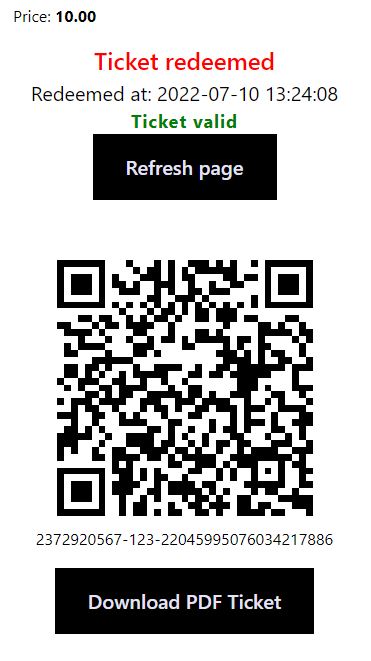
Ticket on Mobile — Customers see their ticket details optimized for any device, with QR code and PDF download. 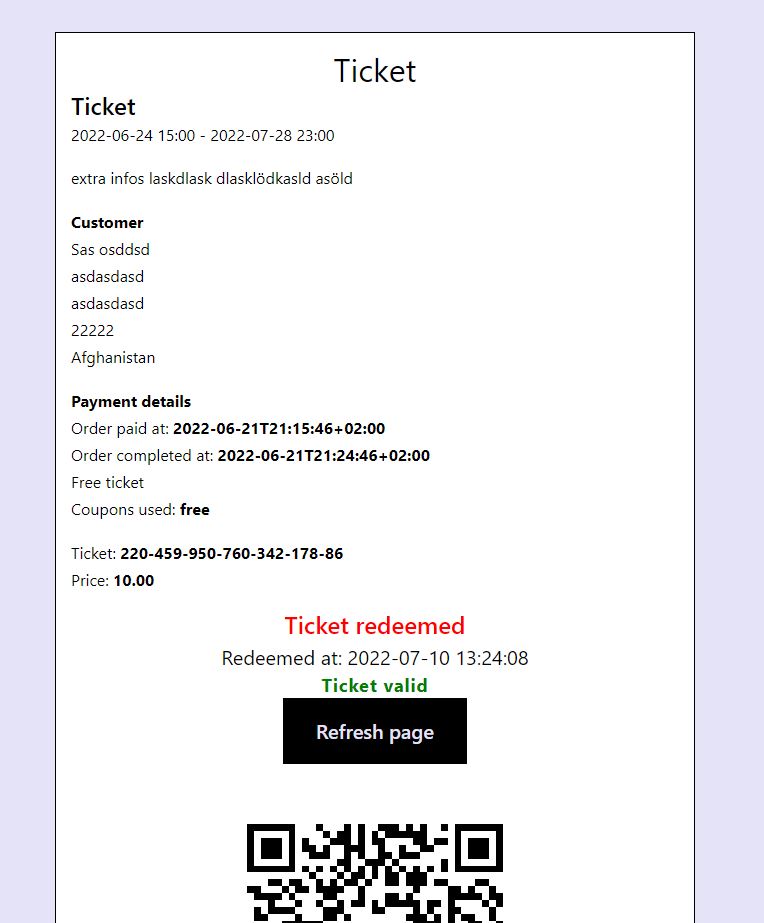
Ticket Details Desktop — Configure exactly which information appears on the ticket detail page. 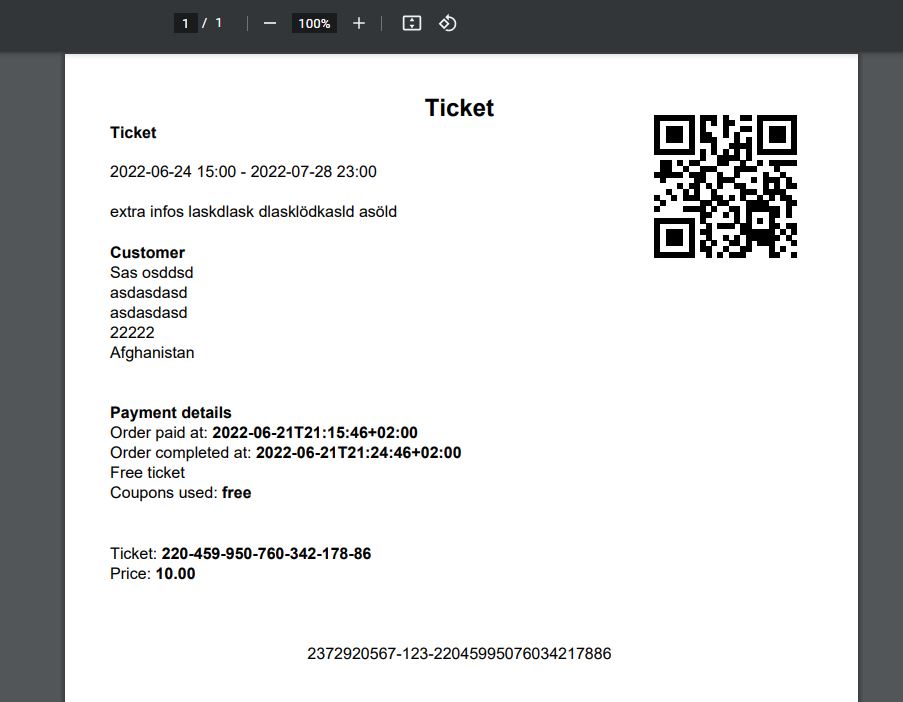
PDF Ticket — Professionally designed PDF ticket with QR code, ready for print or mobile display. 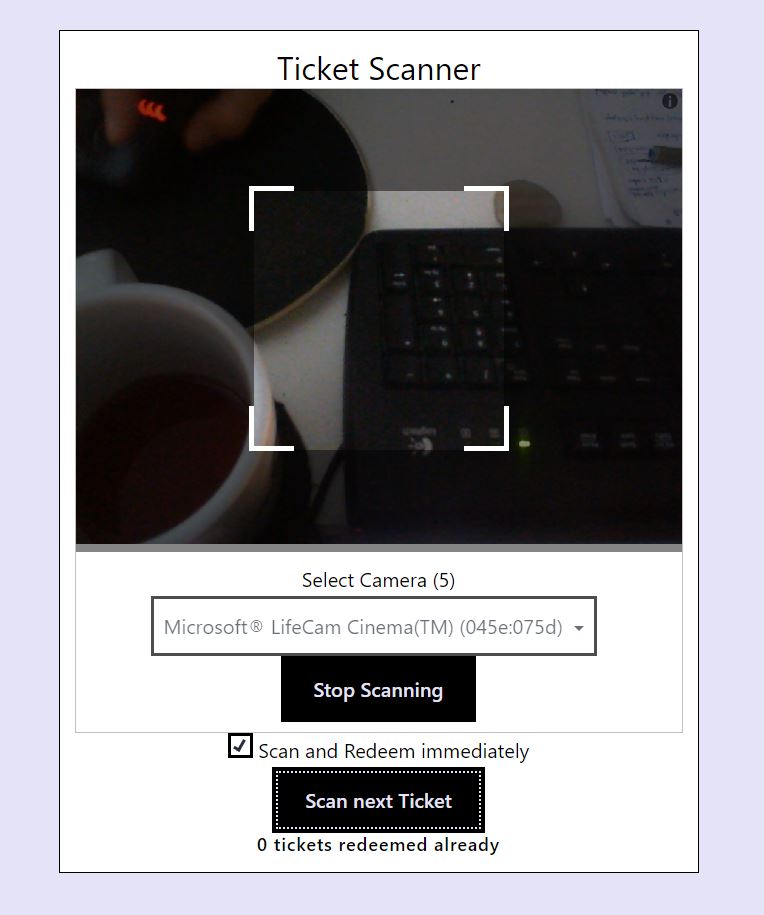
Ticket Scanner — Built-in mobile scanner for your team at the entrance. No app required. 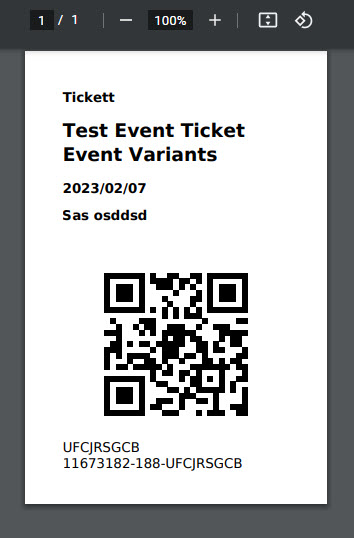
Event Badge — Print name badges for conferences, VIP events, or staff credentials. 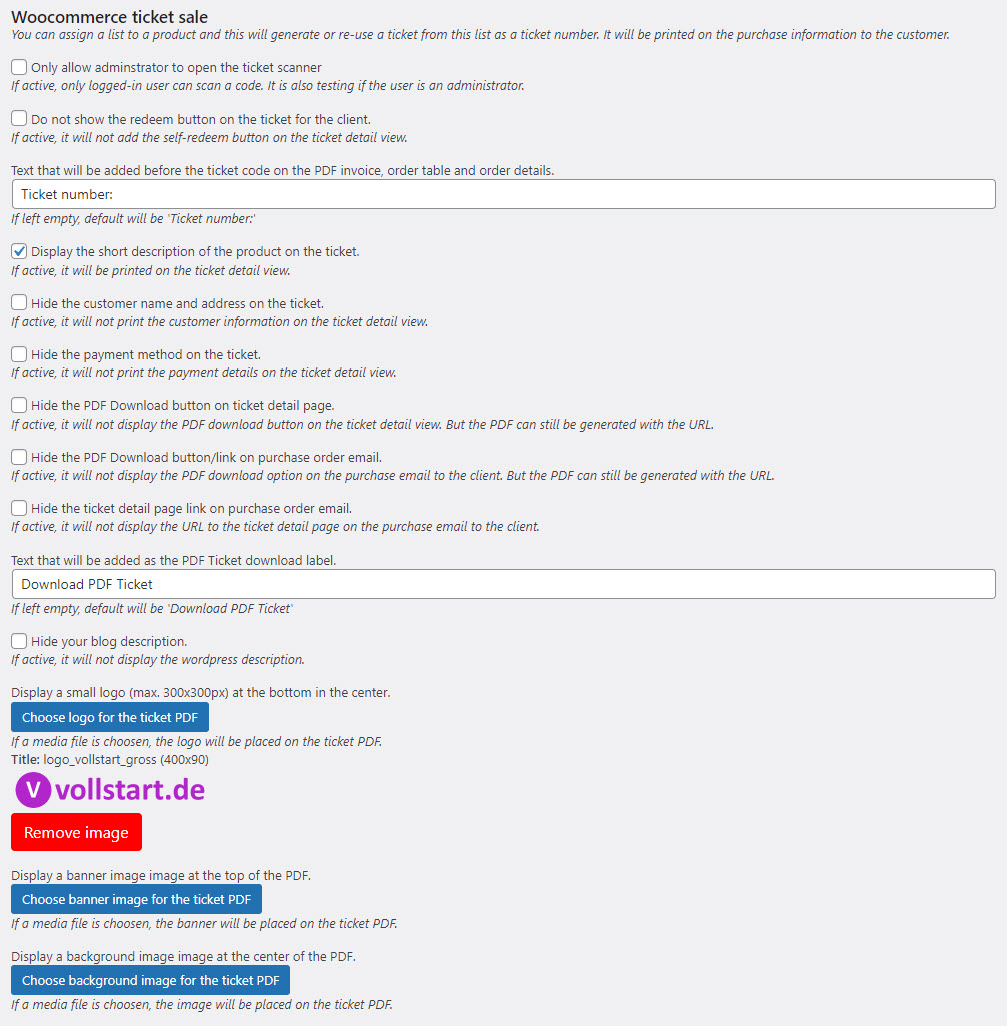
Admin Options — Comprehensive settings to configure ticket behavior, formats, and delivery. 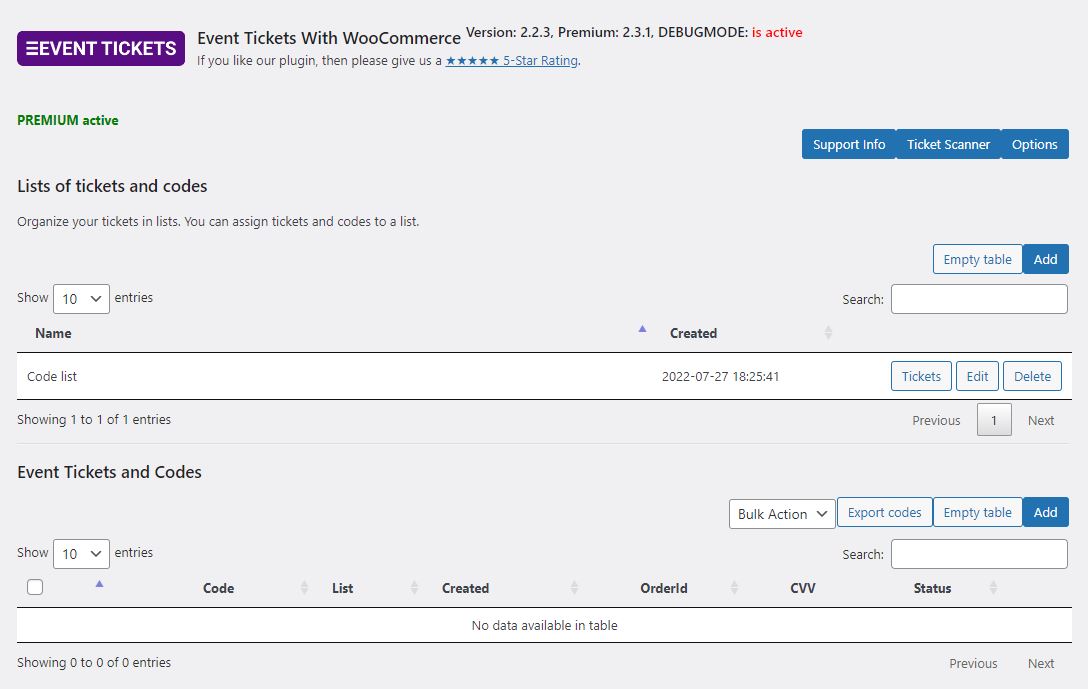
Ticket Management — Overview of all generated tickets with status, redemption info, and filters. 
Ticket Number Formats — Pre-generate ticket numbers or let the plugin create them automatically. 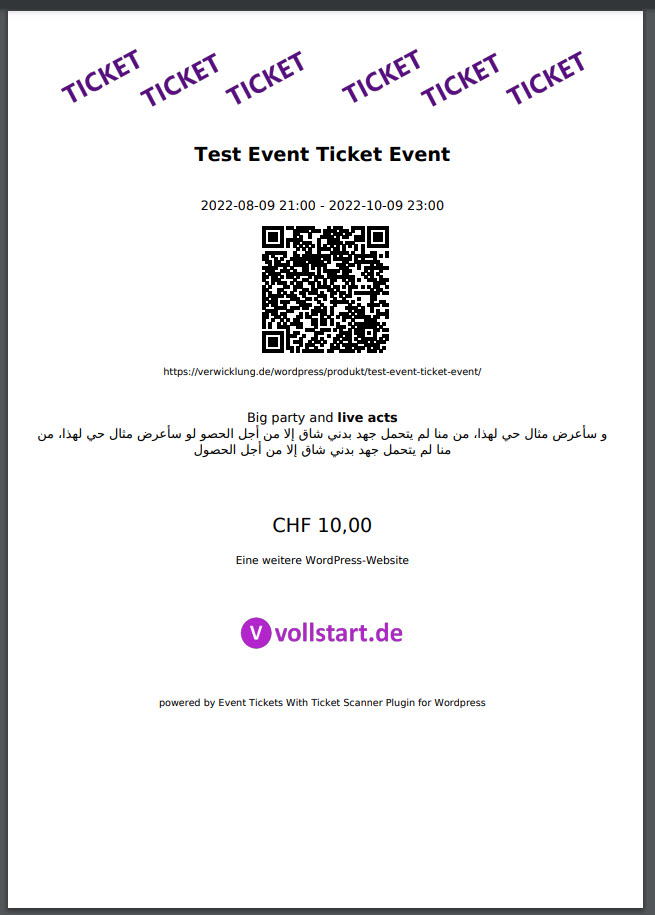
Event Flyer — Generate promotional flyers for your event directly from the plugin. 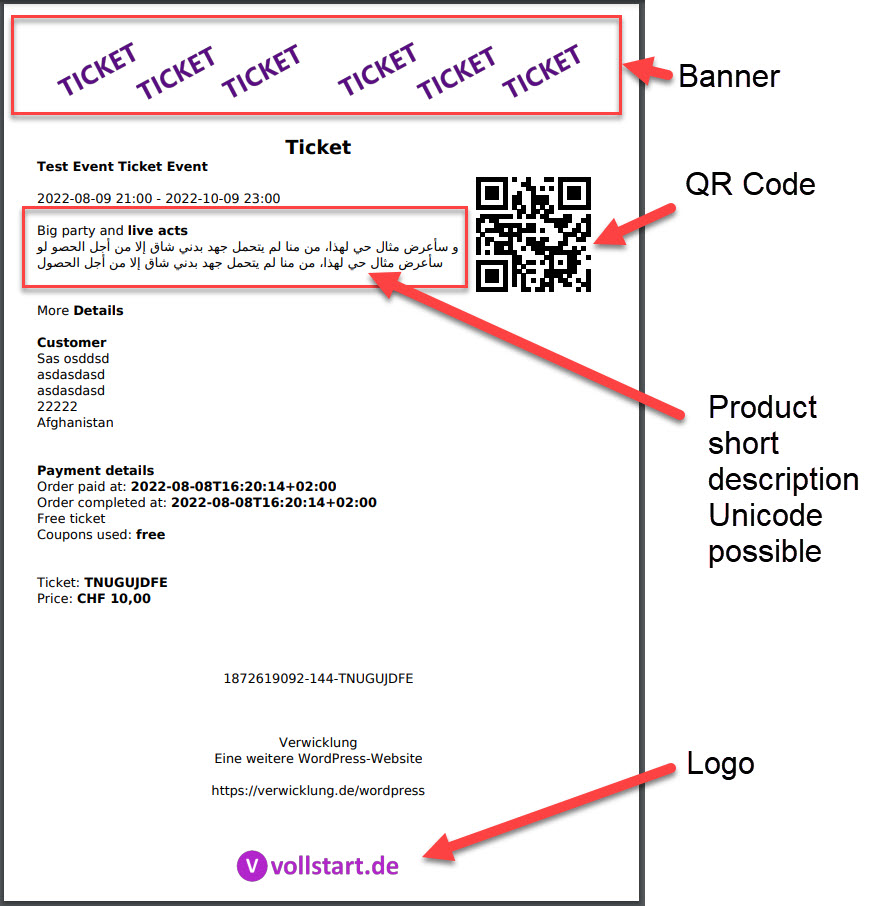
PDF Designer — Customize every area of your ticket PDF: logo, images, QR position, colors. 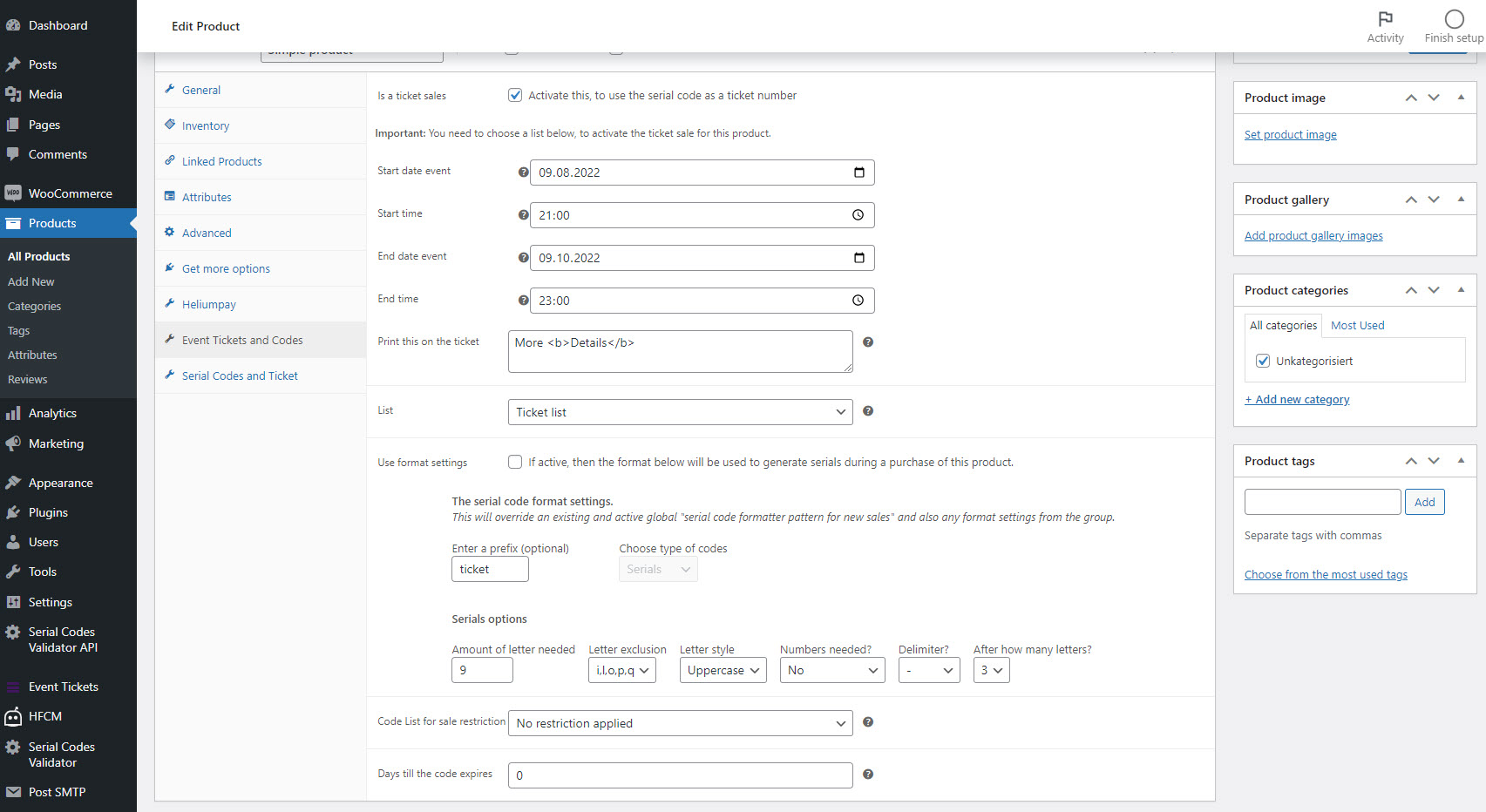
Product Settings — Enable ticket sales on any WooCommerce product with one checkbox. 
Flyer Settings — Configure flyer content, images, and event details. 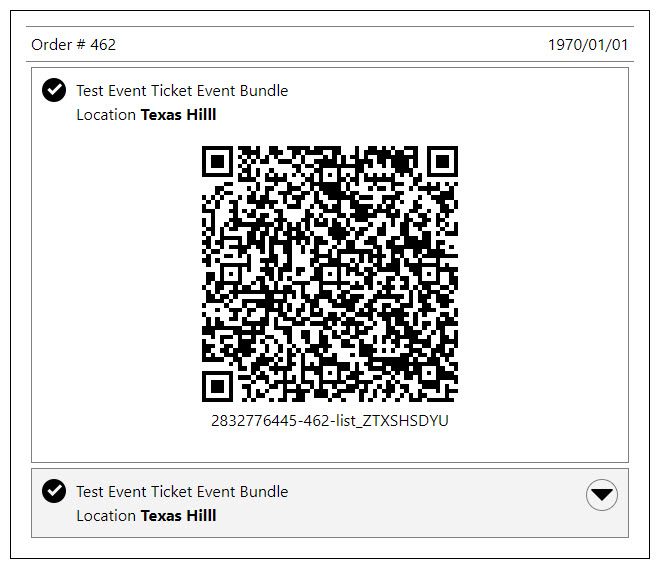
Order Ticket View — Quick-scan tickets directly from the WooCommerce order detail page.
Installation
Requirements
- WordPress 5.0 or greater
- WooCommerce 6.0 or greater
- PHP 8.1 or greater (PHP 8.4 compatible)
- PHP extensions: php-curl, php-imagick
Installation
- Go to Plugins Add New in your WordPress admin
- Search for “Event Tickets with Ticket Scanner”
- Click Install Now, then Activate
- Go to Event Tickets in your admin menu and create your first ticket list
- Edit any WooCommerce product open the Event Tickets tab enable ticket sales
Quick Setup
The plugin extends WooCommerce so any product can become a ticket. Enable the checkbox on your product, assign a ticket list, and you’re ready to sell.
Tip: Set the product as “Virtual” so WooCommerce auto-completes the order and triggers ticket generation immediately after payment.
To test: Create a manual order in WooCommerce, set it to “Completed”, and check the order email for the ticket link.
For a step-by-step walkthrough, watch the quickstart video.
FAQ
-
Do I need any other plugins?
-
You need WooCommerce (free) to handle payments and orders. Everything else is included — no additional ticketing add-ons required.
-
Does this work without WooCommerce?
-
WooCommerce is required for selling tickets. However, you can use the plugin to manage and validate ticket lists manually without WooCommerce sales.
-
Can my team scan tickets without a WordPress account?
-
Yes! Premium includes Auth Tokens that give your door staff scanner access via a simple URL — no login required.
-
Does the scanner work offline?
-
The scanner is browser-based and requires an internet connection. For large events, the plugin includes offline fallback options to prevent interruptions.
-
Can customers choose their own seats?
-
Yes. Design your venue layout with the drag & drop seating designer, and customers will see an interactive seat map during checkout where they can pick available seats.
-
What ticket types can I create?
-
Single entry, multi-entry passes, family tickets (multiple tickets per purchase), memberships with expiration dates, and day-chooser tickets where customers pick their event date.
-
How are tickets delivered to customers?
-
In the free version, the order confirmation email includes a link to download the ticket PDF and view the QR code. Premium allows attaching the PDF directly to the email and adding calendar invites (ICS).
-
What happens when an order is refunded?
-
The ticket is automatically deactivated, the assigned seat is released, and the ticket number is recovered for reuse.
-
Is the plugin compatible with WPML?
-
Yes. WPML is supported for multilingual ticket sales. The scanner also supports multiple languages including German, Spanish, French, Italian, Japanese, Dutch, Portuguese, and Chinese.
-
What if I exceed the free ticket limit?
-
If you reach the limit, the plugin will display a message asking the customer to contact support. Your sales are never interrupted. Premium has no ticket limits.
-
Can I use my own QR code or barcode scanner hardware?
-
Yes. The built-in scanner page accepts input from hardware barcode scanners in addition to camera-based QR scanning.
-
How do I prevent ticket fraud?
-
Every ticket number is unique. The scanner detects duplicate redemption attempts. Premium adds CVV verification and brute-force IP blocking for additional security.
Reviews


Contributors & Developers
“Event Tickets with Ticket Scanner” is open source software. The following people have contributed to this plugin.
Contributors
Translate “Event Tickets with Ticket Scanner” into your language.
Interested in development?
Browse the code, check out the SVN repository, or subscribe to the development log by RSS.
Changelog
3.0.0 – 2026-03-31
- Fix: Admin CSS was cached by Cloudflare/browsers after plugin updates — added version-based cache buster to dynamically loaded stylesheet
- Fix: Scoped global CSS button selectors to plugin container — no longer affects WP admin sidebar
- Fix: Backend CSS now loaded via wp_enqueue_style instead of JS injection (prevents layout shift)
- Fix: Removed duplicate Settings submenu entry (top-level menu only)
- New: QR code scanner on the validator form — users can scan QR codes with their device camera instead of typing codes manually (enable in plugin settings)
- New: License key prompt dialog on settings page instead of browser alert — with direct link to options page
- Fix: Ticket table button column no longer forces minimum width (cleaner layout on small screens)
2.9.9 – 2026-03-23
- Improvement: License check resilience — brief server outages no longer disable premium features; raised failure threshold from 5 to 10, extended staleness window from 10 to 21 days, and server errors (5xx, empty body) now count as transient failures instead of genuine rejections
- Fix: “Check License” button now resets failure counter before server check — previously, accumulated failures from a server outage could prevent recovery even after the server was back online
- Improvement: Modern admin UI redesign — card-based layout with consistent spacing, branded purple accent color, professional footer grid, improved DataTable styling, smooth loading animations, and responsive design
- New: Plugin header now includes Requires at least, Tested up to, and Requires PHP — displayed in support info area for easier troubleshooting
- Fix: Corrected 10 English typos in source strings that caused translation mismatches (e.g. successfull, duplicat, choosen)
- Fix: No more flash of unstyled content when loading admin page
- Improvement: Regenerated all German backend translations — from 162 to 451 strings (full coverage)
- New: FOMO banner for expired premium subscriptions — shows new features released since expiration with dismissible 30-day reminder
- Fix: Added missing License header to plugin file to satisfy WordPress.org plugin check
2.9.8 – 2026-03-11
- Fix: TypeError in WooCommerce email preview and order emails — removed strict type hints from all WooCommerce hook callbacks to prevent crashes with different WC versions
2.9.7 – 2026-03-11
- Fix: Options migration safety net — premium options (e.g. PDF ticket attachment) are now preserved even if the premium plugin was inactive during the database migration from wp_options to the custom options table
2.9.6 – 2026-03-10
- New: Daily Redemption Summary — view redeemed tickets across all products for any date range (Premium)
- New: No-Show count in Attendance view showing unredeemed tickets per event (Premium)
- New: Drill-down from Attendance rows to individual ticket codes with order links (Premium)
- New: Export Attendance data as CSV (Premium)
- Improvement: Seating CSV export/import now includes visual designer data — position, rotation, shape, and color survive roundtrip (Premium) (#209)
- Fix: Seating CSV export appended JSON artifact at end of file — missing exit after CSV output (#209)
- New: Calendar view and printable ticket list on product edit page for daychooser products (#191)
- Performance: Lazy-load single options via getOption() instead of bulk-loading all options
- New: License Server Connectivity Check — diagnostic button in Support area tests if vollstart.com license/update server is reachable. Shows connection status, response time, and detailed error messages. Helps diagnose Premium update issues caused by firewalls, DNS problems, or network restrictions.
- Improvement: Subscription expiration warnings now distinguish between license types — lifetime/onetime licenses show no warning (continue working with Basic < 2.8.0), monthly subscriptions warn about payment processing, yearly subscriptions warn about expiration.
- Improvement: Renamed “Serial Key” to “License Key” in all user-facing strings for clarity
- Improvement: Complete translations for all 11 languages (DE, ES, FR, HU, IT, JA, NL, PT_BR, PT_PT, ZH_CN, DE_CH) — 100% coverage
2.9.5 – 2026-03-03
- Fix: Premium serial key displayed as 0 after options migration — premium features appeared lost. Options added late during initialization (e.g. by the premium plugin) are now loaded correctly from the custom table.
2.9.4 – 2026-03-03
- Performance: Plugin options migrated from individual wp_options rows to a dedicated custom table — all settings now load in a single query instead of 150+ separate queries (#73)
- New: Options change history — tracks who changed which setting, when, with old and new values. Revert button to restore previous values. Keeps last 10 entries per option, older entries cleaned up automatically. Available in Options > Change History tab (#73)
- New: Context-Wizards — smart suggestions on the options page based on your current configuration. Detects related settings and offers to enable them with one click. Covers email attachments, scanner presets, ticket display, and security settings. Dismissals are per-user (#232)
- New: Export and import seating plan seats via CSV for backup, external editing, or transfer between plans (Premium) (#209)
- Fix: Old premium plugin (< 1.6.0 or without version constant) caused crash instead of being gracefully blocked
- Fix: Options migration is now abort-safe — if interrupted, it resumes on next page load instead of silently losing settings. Existing values are updated correctly on re-run.
- Fix: Database upgrade jobs now run before saving the new DB version, preventing incomplete upgrades from being marked as finished
- Fix: Premium or third-party upgrade hooks that throw exceptions are now caught and logged instead of causing an infinite crash loop
- Security: Activate global ticket counter brake to prevent free limit bypass via delete-and-recreate
2.9.3 – 2026-03-02
- New: “Check License” button — recheck premium license status on demand from Options page (next to serial field) and Support Info page. Shows status, last check, expiration, failure count.
- Improvement: Saving a serial key now immediately checks the license and shows the result inline. On success, the page reloads automatically so premium features are available without manual refresh.
- Improvement: “Check License Now” button bypasses the 7-day server cache to always get a fresh response
- Fix: Dismiss button for ticket format warnings did not work — two bugs: nonce parameter name mismatch, and wp_redirect() called during admin_notices (after output started). Dismiss handler now runs on admin_init.
- Fix: JavaScript error “cannot call methods on dialog prior to initialization” — closeDialog() tried to destroy all dialog elements on page instead of only the target dialog
- Fix: backend.js could be cached by browser across updates — jQuery.getScript() bypassed WordPress cache busting. Now uses file modification time as additional cache-buster parameter.
- New: Setup Wizard — multi-step dialog guides new users through use-case selection (Event tickets, Day passes, Memberships, Vouchers) and configures optimal settings automatically. Covers redemption rules, scanner behavior, email delivery (ICS, date, order view), and order processing. Premium users also get PDF attachment settings. Re-launchable via “Start Wizard” button.
- New: Premium Wizard — one-time dialog when premium is activated, offers to enable recommended premium defaults (PDF email attachment, merge into one PDF). Re-launchable via “Premium Wizard” button (only visible with premium). (#233)
- New: Export/Import options — backup and restore all plugin settings as JSON file
- New: “Max redeems per day” option per product — limit how many times a multi-redeem ticket can be redeemed on a single day (0 = unlimited, only total max applies)
- Improvement: “First Steps” onboarding box upgraded to interactive card with progress bar, auto-detection of completed steps, and action buttons
- Improvement: Code generation now uses date-based prefix (encoded as 5 letters) to partition address space — virtually eliminates collisions even with short code formats
- Improvement: Increased code generation retry limit from 100 to 500 attempts
- Improvement: Ticket detail view now shows WooCommerce order status, billing email, product name, and variation attributes
- Improvement: Support Info — options list is now hidden behind a button click to reduce page load clutter
- Improvement: Bulk action dropdown now shows a message when no tickets are selected
- Improvement: AJAX calls now properly handle network-level errors (timeout, connection lost)
- Improvement: Cart input fields (name per ticket, restriction code) now auto-save on Enter key (#234)
- New: Auto-update dialog — after entering a serial key with an outdated premium plugin, automatically checks for updates and offers to install them. Shows release notes for users without an active subscription.
- Fix: Value-per-ticket dropdown in cart never saved — selector targeted wrong element type and attribute (#234)
- Fix: Options in-memory cache corruption in _setOptionValuesByKey() — variable name collision caused stale/incorrect values within the same request
- Fix: Restriction code input in cart crashed on PHP 8.x due to wrong constant name case (META_KEY_CODELIST_RESTRICTION_order_item _ORDER_ITEM)
- Fix: False “Ticket format exhausted” warning when free version ticket limit (32) was reached — #208 exception was incorrectly triggering format warning on first attempt
- Fix: clearFormatWarning() never actually cleared warnings — editList() was called with wrong signature, exception silently caught
- Fix: “Edit list” link in format warning notice and email pointed to non-existent admin page
- Fix: Import options failed silently due to WordPress wp_magic_quotes escaping JSON — now handled via stripslashes
- Fix: Product meta save could trigger PHP warning for undefined array key due to operator precedence bug
- Fix: Admin ping timeout (e.g. when browser tab is frozen) no longer shows repeated error dialogs
- Fix: Typo in displayFirstStepsHelp option description (“activet” “activated”)
2.9.2 – 2026-02-23
- Fix: Format warning data (attempts, last_email) was never persisted — editList() called with wrong signature and would auto-clear warnings
2.9.1 – 2026-02-23
- Fix: Crash during checkout when format warning check runs (undefined method _json_encode_with_error_handling)
2.9.0 – 2026-02-23
- Fix: Crash on PHP 8.x when plugin loading order puts basic before premium (e.g. after auto-update) — now defers premium loading via plugins_loaded hook
- Fix: Crash in get_expiration() on PHP 8.x when license data contains invalid JSON
- New: Old premium versions (< 1.6.0) are now gracefully blocked instead of causing fatal errors — site runs as free with admin warning
- New: Serial key field shown in basic plugin settings when old premium is detected, so users can still manage their license
- Improvement: License check now properly throttles retries when serial key is invalid, preventing excessive server calls
- Improvement: Changing the serial key now immediately triggers a fresh license check instead of waiting for the next cycle
- Fix: Invalid serial key no longer causes license check on every page load
- Fix: All non-German translations (NL, ES, IT, PT_BR, PT_PT, HU, JA, ZH_CN) replaced with proper localized translations — previously contained German text
- Fix: Renewal and reactivation links in admin notices pointed to wrong URL
- Fix: Ticket redemption blocking (“deny redeem before event start”) was off by the GMT offset for non-UTC timezones
2.8.10 – 2026-02-18
- Fix: Premium license recovery — license revalidation now runs even when local license data is stale, preventing permanent premium lockout
- Fix: Stale “notvalid” flag is now cleared when the license server confirms a valid subscription
2.8.8 – 2026-02-18
- Fix: Option “No login required to access scanner” (wcTicketScannerAllowedRoles) now works correctly again for non-authenticated users
- Fix: PHP 8.4 compatibility — explicit nullable type hints for deprecated implicit nullable parameters
- Improved: Updated translations for all 11 languages (DE, ES, FR, HU, IT, JA, NL, PT-BR, PT-PT, ZH) with 16 new strings from v2.8.6 and v2.8.7 (PWA, scanner options, format warnings)
- New: Ticket scanner shows timestamp of last scan for better tracking
- New: Admin notice when PHP version is below the required 8.1
- Improved: Corrected library version display in system info (FPDF 1.85, Twig PHP requirement note)
2.8.7 – 2026-02-16
- New: PWA (Progressive Web App) support — install the ticket scanner as a home screen app on mobile devices (optional, enable in settings)
- New: Fullscreen mode button for the ticket scanner — immersive scanning without browser chrome
- New: Haptic feedback (vibration) on scan result — different patterns for success and failure
- New: Customizable scanner theme color — affects PWA status bar, loading spinner, and scanner buttons
- New: Expanded FAQ with 7 categories and 21 questions covering scanner setup, PDF design, WooCommerce, webhooks, and more
- Improved: Scanner HTML now uses proper DOCTYPE, charset, and viewport meta tags
- Improved: Scanner assets (JS libraries, CSS, images) cached by service worker for faster loading
- Security: Hardened premium license revalidation with independent subscription verification
- Security: Added HMAC checksum protection against license data tampering in database
- Fix: Resolved infinite recursion during plugin initialization when premium plugin is active
- Fix: Translation loading no longer triggers WordPress 6.7+ “too early” notice
- Fix: License checksum verification now stable across CLI and web contexts
- Fix: License server response now correctly overrides local data (fixed array_merge order)
- Fix: API connection failures are now tracked; premium deactivates after 5 consecutive failures
- Fix: Admin page loads now trigger license check if last check was >24h ago (cron fallback)
- Fix: License key input field now always visible when premium plugin is installed
2.8.6 – 2026-02-11
- New: Full bleed mode option for ticket designer — removes ALL margins for edge-to-edge background images.
- New: Separate full bleed option for test ticket designer.
- New: Ticket background color option — set a custom background color for PDF tickets, badges, and flyers.
- New: Ticket number format exhaustion warning — alerts admin when ticket format is running out of combinations (counter-based detection).
- New: Automatic email notifications when ticket format reaches 50% capacity or is exhausted (once per day).
- New: Admin notice with dismiss button for format warnings, includes direct link to edit ticket list.
- New: Format warning auto-clears when ticket list is manually saved (user likely adjusted formatter).
- Security: Fixed unauthenticated REST endpoint that exposed admin dispatcher (CVSS 9 — reported by Patchstack).
- Security: REST permission callback now requires authentication (login or authtoken) by default.
- Security: Added capability guards for sensitive admin actions (defense in depth).
- Security: Removed wp_rest nonce fallback from admin action handler.
2.8.5 – 2026-01-26
- Fix: Fatal error on non-premium installations when SASO_EVENTTICKETS_PREMIUM_PLUGIN_VERSION constant is undefined.
- Improved: VollstartValidatorDebug URL parameter now passed through to AJAX requests for easier debugging.
2.8.4 – 2026-01-26
- New: Seating plan visualization in ticket scanner — view venue map with highlighted seat position.
- New: Option to enable/disable seating plan button in scanner.
- New: Option to enable/disable venue image button in scanner.
- Improved: Seating plan data loaded on demand (lazy loading) for better scanner performance.
- New: Shortcode parameter
order_idfor [sasoEventTicketsValidator_code] to display tickets from a specific order. - New: Shortcode [sasoEventTicketsValidator_ticket_detail] to display ticket detail view on any page.
- Fix: Date localization now correctly displays translated month/day names while maintaining correct timezone handling.
- Fix: Fatal error in removeUsedInformationFromCode() when changing order status.
2.8.3 – 2026-01-22
- New: Seating Designer — Element rotation (0-359°) with preset buttons.
- New: Seating Designer — Group rotation (rotate multiple selected elements around their common center).
- New: Seating Designer — Bulk property editing when multiple elements are selected.
- New: Seating Designer — Duplicate selection for groups (copy multiple elements at once).
- New: Seating Designer — Enhanced visual feedback for multi-selected elements.
- Improved: Seating API now uses unified bulk operations for better performance.
- Fix: PDF QR code compatibility with third-party FPDI libraries.
- Fix: Event times displayed incorrectly due to double timezone conversion in ticket templates.
2.8.2 – 2026-01-21
- New: Clone/duplicate seating plans with all seats and layout.
- New: Batch operations for seats (activate, deactivate, delete multiple seats at once).
- New: Premium subscription expiration check with admin warnings and grace period.
- New: Lifetime license support.
- New: Delete All Tickets button on ticket list with double confirmation.
- New: Shortcode parameter download_all_pdf for downloading all user tickets as one PDF.
- New: Safety check when deleting ticket lists — warns if list is still assigned to products.
- Fix: Restored deprecated methods for backward compatibility with older premium plugin versions.
2.8.1 – 2026-01-20
- Fix: PHP 8.4 compatibility — explicit nullable type for REST API parameter.
2.8.0 – 2026-01-20
- New: Interactive seating plan designer with drag & drop editor for creating venue layouts.
- New: Let customers choose their seats during checkout with visual seat selection.
- New: Seat information displayed on PDF tickets, in emails, and in the ticket scanner.
- New: Automatic seat blocking during checkout with configurable timeout.
- New: Seat release on order cancel or refund.
- New: Seating plan support on shop/archive pages.
- New: Voice output for the ticket scanner.
- Improved: Security checks for admin area access.
- Improved: Public ticket number now displayed in emails instead of internal ticket number.
- Fix: Ticket list description slashes.
- Fix: Customer search in admin backend.