

Description
iAmAI Connector links your WordPress / WooCommerce store to the iAmAI service (https://www.iam-ai.co.il) — an external SaaS platform that automatically writes and applies SEO, AEO (Answer Engine Optimization), and AI-visibility improvements to your site.
This plugin requires a free or paid iAmAI account. All features work with a free iAmAI account; paid tiers add higher AI-mention scan rate and additional analytics.
What the plugin does:
- Automatic title, description, and meta-tag optimization
- Auto-generated FAQ and Schema.org markup (FAQ, BreadcrumbList, Product)
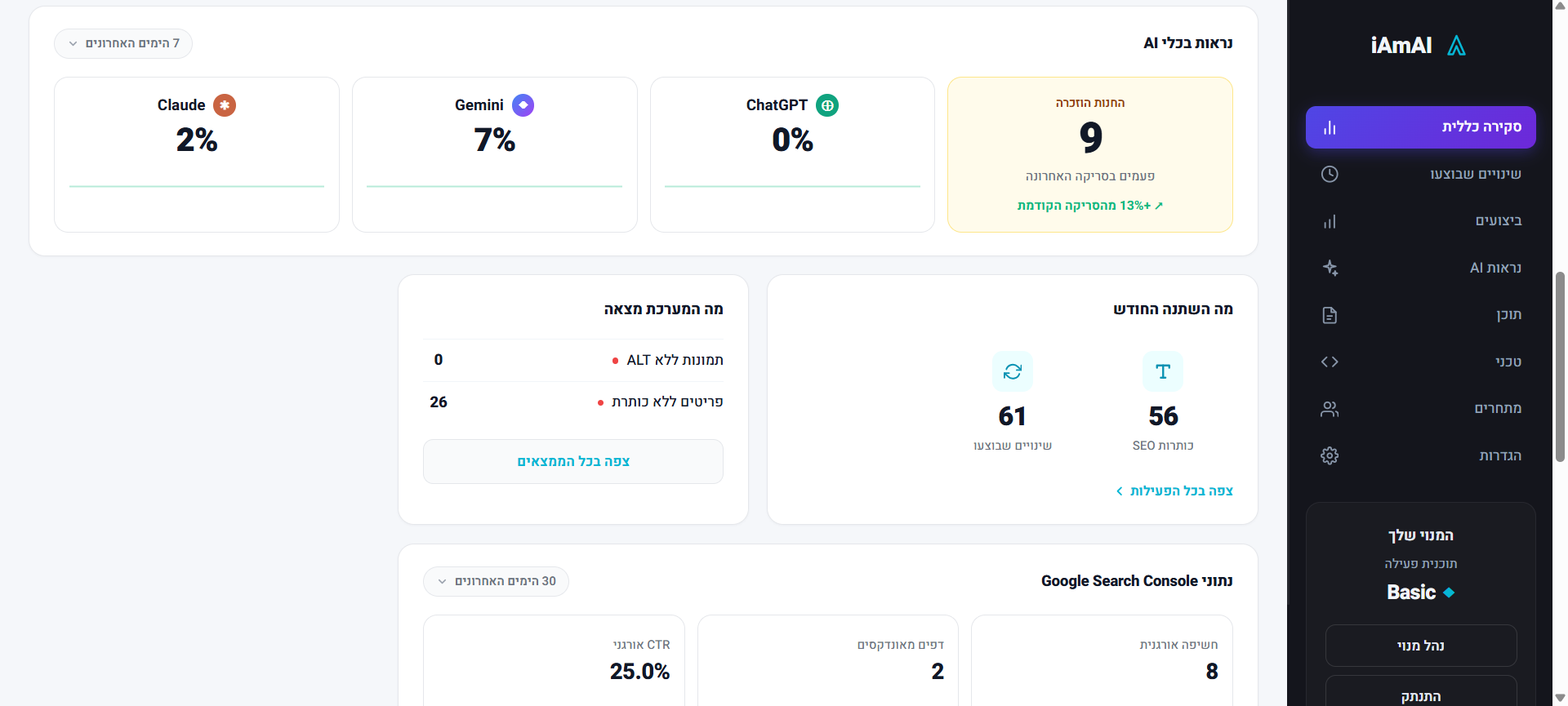
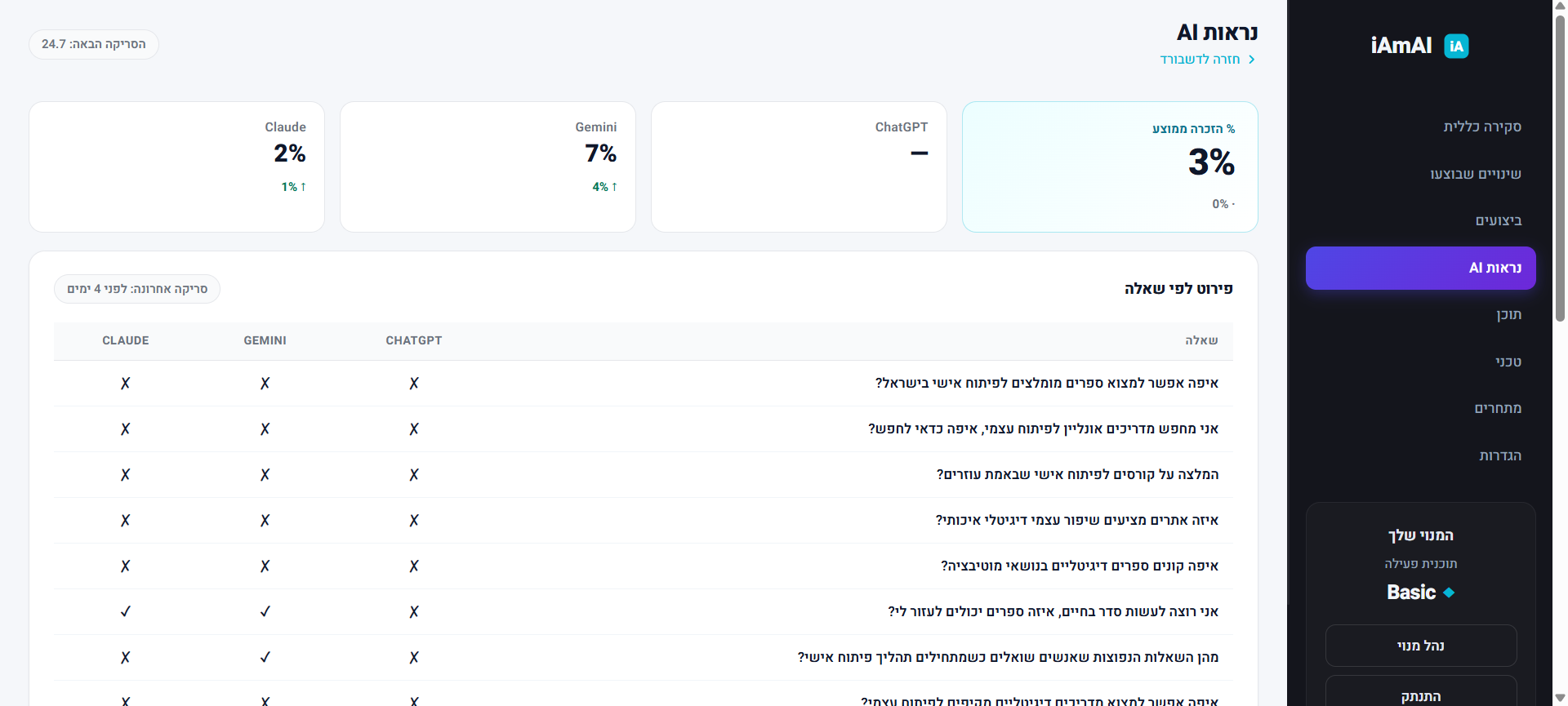
- Rank tracking in Google + AI engines (ChatGPT, Gemini, Claude)
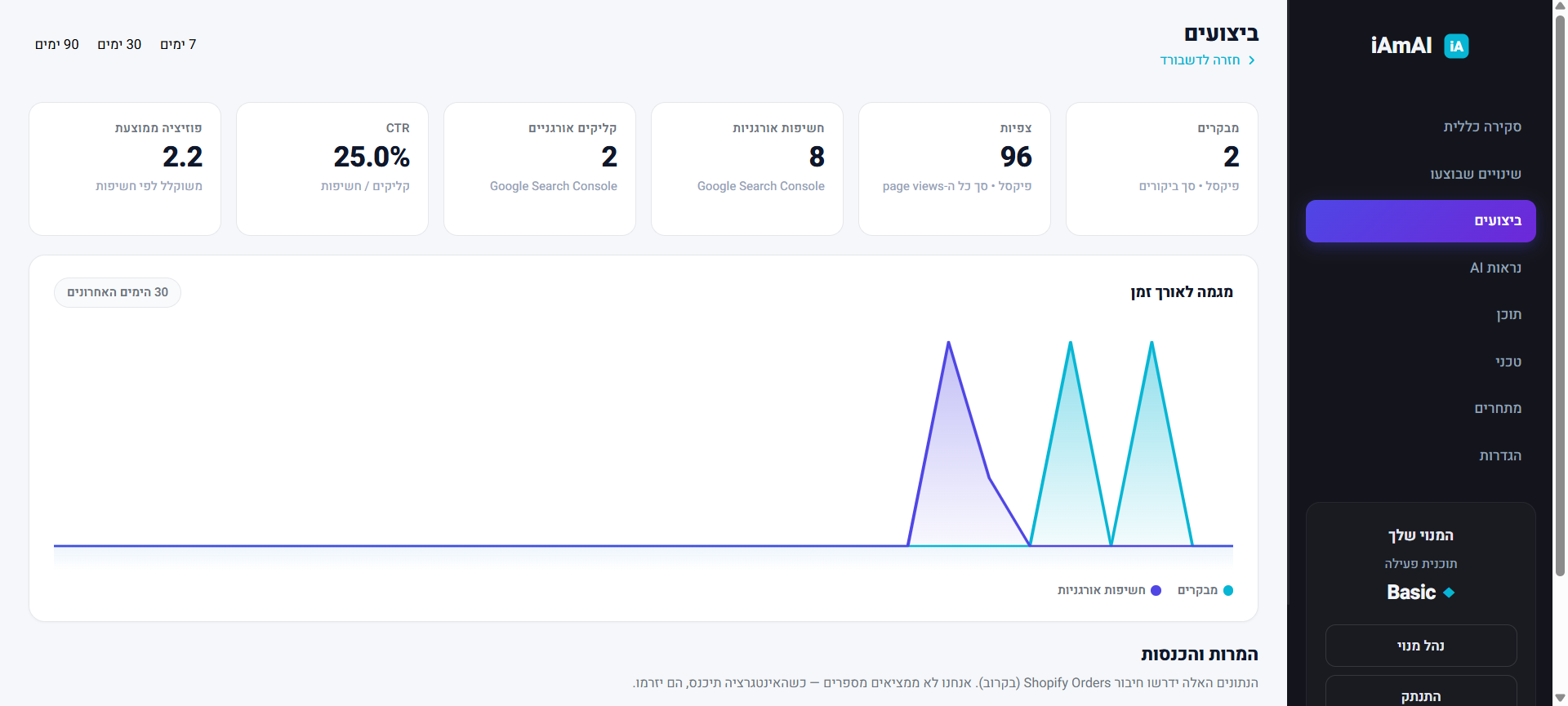
- Weekly traffic reports
- Smart internal linking
- Google Search Console verification token injection
How it works:
- Install and activate the plugin.
- Click “Connect to iAmAI”. The plugin creates a WordPress Application Password and sends it to iAmAI so iAmAI can scan and update your site.
- iAmAI scans your store and starts pushing SEO improvements. iAmAI applies them automatically; you track everything from your dashboard.
The connection is built on standard WordPress Application Passwords (available since WP 5.6). You can revoke access at any time from Users Profile Application Passwords, or by clicking “Disconnect” inside the plugin’s settings page.
עברית
iAmAI Connector מחבר את אתר ה-WordPress / WooCommerce שלכם לפלטפורמת iAmAI לאופטימיזציה אוטומטית של SEO, AEO ונראות במנועי AI. התוסף דורש חשבון iAmAI (חינמי או בתשלום).
מה התוסף עושה:
- אופטימיזציה אוטומטית של כותרות, תיאורים ומטא-תגיות
- יצירת FAQ ו-Schema.org אוטומטיים
- מעקב דירוגים בגוגל וב-AI (ChatGPT, Gemini, Claude)
- דוחות שבועיים על שיפורי תנועה
- קישורים פנימיים חכמים
- הזרקת קוד אימות של Google Search Console
איך זה עובד:
- מתקינים ומפעילים את התוסף.
- לוחצים “התחבר” — התוסף יוצר Application Password אוטומטית ושולח ל-iAmAI.
- iAmAI סורקת את האתר ומחילה את השיפורים אוטומטית; עוקבים אחר הכל בדשבורד.
החיבור משתמש ב-Application Passwords הסטנדרטיים של WordPress (זמינים מ-WP 5.6); ניתן לבטל את הגישה בכל רגע מ-Users Profile Application Passwords או דרך כפתור “ניתוק” בעמוד התוסף.
Third-Party Services
This plugin connects your WordPress site to the iAmAI service (an external third-party SaaS at https://www.iam-ai.co.il) and exchanges data with it. The plugin will not function without an iAmAI account.
The following calls are made to the iAmAI backend:
1. On Connect (one-time, when an admin clicks the “Connect to iAmAI” button)
- Endpoint:
POST https://www.iam-ai.co.il/api/integrations/wordpress?action=install - Data sent: site URL, site name, admin username, admin email, a WordPress Application Password (stored encrypted on iAmAI side using AES-256-GCM), WordPress version, WooCommerce installed flag, plugin version.
- Purpose: provision your store inside iAmAI and let iAmAI write SEO updates back via the REST API.
2. On Disconnect / Deactivate / Uninstall (one-time per event)
- Endpoint:
POST https://www.iam-ai.co.il/api/integrations/wordpress(actiondisconnectorplugin_event). - Data sent: store ID, API token, event type (
disconnect,deactivated, oruninstalled), site URL, plugin version. - Purpose: let the iAmAI dashboard reflect your status immediately instead of waiting for the next health check.
3. On every admin visit to the plugin’s settings page (cached 60s)
- Endpoint:
GET https://www.iam-ai.co.il/api/integrations/wordpress?action=status&store_id=…&token=… - Data sent: none (lookup by store ID).
- Purpose: render the live status strip (products synced, last sync time, pending recommendations).
4. On every page render of singular posts/pages (server-side, cached 1 hour per store)
- Endpoint:
GET https://www.iam-ai.co.il/api/seo/faq-public?store_id=… - Data sent: none beyond the store ID.
- Purpose: fetch the merchant’s applied FAQ entries and inject
FAQPageSchema.org JSON-LD into the page<head>.
5. On every non-front-page render (server-side, cached 1 hour per page)
- Endpoint:
GET https://www.iam-ai.co.il/api/seo/breadcrumb-public?store_id=…&path=… - Data sent: store ID and the requested URL path.
- Purpose: fetch and inject
BreadcrumbListSchema.org JSON-LD.
6. On every WooCommerce product page (server-side, cached 1 hour per product)
- Endpoint:
GET https://www.iam-ai.co.il/api/seo/product-schema-public?store_id=…&path=… - Data sent: store ID and the product URL path.
- Purpose: fetch and inject
ProductSchema.org JSON-LD.
7. On every storefront page view (visitor side, async, non-blocking)
- Script loaded:
https://www.iam-ai.co.il/pixel.js?sid=…&platform=wordpress - Beacon endpoint:
POST https://www.iam-ai.co.il/api/v1/p-signal - Data sent: page URL, referrer, anonymous visit identifier, and basic interaction events (page views, add-to-cart on WooCommerce loop buttons).
- The pixel does not load for logged-in administrators (
manage_optionscapability), and it does not load on admin, login, or AJAX pages. - Purpose: SEO analytics that the iAmAI dashboard uses to score which optimizations are working.
Backend site writes
iAmAI’s backend uses the WordPress REST API (authenticated with the Application Password created at install) to write back into your site:
POST /wp-json/iamai/v1/seo-fields— sets meta title, meta description, and focus keyword on individual posts (stored as standard postmeta fields).POST /wp-json/iamai/v1/gsc-verification— sets a Google Search Console verification token that the plugin injects into<head>via the standardgoogle-site-verificationmeta tag.
Terms and Privacy
- iAmAI Terms of Service: https://www.iam-ai.co.il/terms
- iAmAI Privacy Policy: https://www.iam-ai.co.il/privacy
Visitor tracking through the storefront pixel is anonymous, but as the site operator you remain responsible for any disclosures and consent required under GDPR / CCPA / local law. The iAmAI Privacy Policy describes the data iAmAI receives and how it is stored.
Screenshots
Installation
- Download the plugin ZIP from iAmAI (or via the WordPress.org plugin directory) and upload it via Plugins Add New Upload Plugin.
- Activate the plugin.
- Click the new iAmAI menu item in the WordPress admin sidebar.
- Click “Connect to iAmAI”.
That’s it — the connection is immediate. The plugin will create an Application Password named “iAmAI Connector” under the admin user and send it to the iAmAI server.
FAQ
-
Is the plugin safe?
-
Yes. The connection uses standard WordPress Application Passwords. You can revoke access at any time from Users Profile Application Passwords, or by clicking “Disconnect” inside the plugin.
-
What data is sent to iAmAI?
-
See the dedicated Third-Party Services section above for the complete list. In short:
- On connect: site URL + name, admin username + email, an Application Password (encrypted at rest on iAmAI side), WordPress + WooCommerce versions.
- On every page render: cached fetches of FAQ / breadcrumb / product schema markup.
- On every visitor pageview: an anonymous analytics pixel (logged-in admins excluded).
-
What happens when I disconnect?
-
- The plugin deletes the Application Password from WordPress.
- The plugin notifies iAmAI; iAmAI deletes the store record on its side.
- SEO meta titles / descriptions previously written into your posts remain (they are stored as standard WordPress postmeta and you can edit or delete them manually from the post editor).
-
What happens when I uninstall the plugin?
-
- All plugin options are cleared.
- The Application Password is not automatically revoked on uninstall — click “Disconnect” before uninstalling, or revoke it manually from Users Profile Application Passwords.
- The Google Search Console verification meta tag and the iAmAI-written meta titles persist on your posts. They are standard WordPress data and you can edit them.
-
Do I need a paid iAmAI account?
-
No. All plugin features work with a free iAmAI account. Paid tiers add higher AI-mention scan rates and additional analytics dashboards.
-
Where are the iAmAI Terms of Service and Privacy Policy?
-
- Terms: https://www.iam-ai.co.il/terms
- Privacy: https://www.iam-ai.co.il/privacy
Reviews
There are no reviews for this plugin.
Contributors & Developers
“iAmAI Connector” is open source software. The following people have contributed to this plugin.
Contributors
Translate “iAmAI Connector” into your language.
Interested in development?
Browse the code, check out the SVN repository, or subscribe to the development log by RSS.
Changelog
1.1.7
- Compatibility: Tested up to WordPress 7.0.
- Fix: pixel script now registered via wp_enqueue_script() / wp_add_inline_script() instead of direct echo, per WordPress coding standards.
- Fix: wp_parse_url() replaces parse_url() in breadcrumb and product-schema injectors.
- Fix: wp_json_encode() in JSON-LD and inline-script output now includes JSON_HEX_TAG | JSON_HEX_APOS | JSON_HEX_QUOT flags.
- Fix: wp_unslash() added before REQUEST_URI usage in breadcrumb and product-schema injectors.
- Fix: missing /* translators: */ comments added for plural-capable i18n strings.
- Fix: _n() singular forms now include the %d placeholder for full translator compatibility.
- Fix: uninstall.php version references updated to 1.1.7.
1.1.6
- New: product pages now render og:image + twitter:image (main product image, same source as the Product JSON-LD) plus twitter:card=summary_large_image, og:url, og:type, og:site_name — so a shared product link shows a cover-image card on WhatsApp/Facebook/Twitter. The backend supplies these as a generic
meta_tagslist (single source of truth); the plugin renders them verbatim, so future meta changes need no plugin update. Skipped when an SEO plugin (Yoast/RankMath/AIOSEO) is active, which emits its own og:image.
1.1.5
- Readme: full External Services disclosure section (listing every endpoint the plugin contacts, what data is sent, when, and why), per WordPress.org submission guideline 6/7.
- Readme: stable_tag synchronized to the plugin version (was 1.1.3 while plugin shipped 1.1.4).
- Readme: Tested up to bumped to 6.7. Tags reduced to 5 (
automationdropped as redundant withseo+optimization). - Security: dropped
JSON_UNESCAPED_SLASHESfrom the FAQ, Breadcrumb, and Product schema JSON-LD encoders so</script>cannot break out of the inline<script type="application/ld+json">block.
1.1.4
- New: deactivation webhook — fires a
plugin_eventPOST to the iAmAI backend so the dashboard can show “deactivated” immediately. Sibling to the existing uninstall webhook. Best-effort with a 5s timeout; deactivation never fails because of an HTTP error.
1.1.3
- Layout: force RTL anchoring on the header (“iAmAI Connector” + logo + sub now cluster on the right edge instead of centering — fixes inheritance break when a WP-admin parent forces dir=”ltr”).
- Visual: replaced the stylised stroke-only “globe” mark with the official WordPress logo (Simple Icons, MIT) rendered in canonical brand blue (#21759B), sized to match the iAmAI icon (30px). The “Connected” card’s WPiAmAI viz now reads as the real brand instead of a generic icon.
1.1.2
- Layout: unified right-aligned (RTL-natural) text alignment across both connection states. The disconnected hero CTA no longer center-aligns, matching the connected state’s data cards. WordPressiAmAI viz and first-connect modal stay centered as graphics.
- New: dashboard CTA is now context-aware. When the server reports the store no longer exists (HTTP 401/403/404 from /status), the “פתחו דשבורד” button changes to “השלימו הרשמה ב-iAmAI” and routes to /v3/start/ instead of a broken dashboard URL. Transient failures (5xx, network) keep the normal dashboard CTA.
- Internal: fetch_status() now exposes the HTTP status of the underlying API call so the UI can distinguish broken-connection errors from transient ones.
1.1.1
- Fix: “המערכת הופעלה בהצלחה” popup was stuck visible after first connect — the modal CSS used
display: flexat higher specificity than the browser’s[hidden] { display: none }UA rule, so thehiddenattribute had no visible effect. Added an explicit.iamai-modal[hidden] { display: none }override and a defensivemodal.hidden = trueright before the reload.
1.1.0
- New: Connection Center admin UI — clean Stripe-Connect-style layout with status strip, 4 cards (connection, sync status, what’s happening, help) and a small disconnect.
- New: One-shot “המערכת הופעלה בהצלחה” popup on first connect, reminding merchants to return to the iAmAI tab.
- New: Live status panel — products count, last-sync time, pending recommendations — fetched from iAmAI server with a 60s cache + manual refresh button.
- Visual: removed marketing bullets, large floating robot, and gradient text. Added a compact WordPressiAmAI connection visualization on the connected card.
- CSS: rewrote with scoped specificity (
.iamai-connection-center) — zero !important rules, cleaner overrides over WP admin defaults. - Internal: status fetch wrapper (IAmAI_Connect::fetch_status) with transient cache; new iamai_refresh_status AJAX endpoint.
1.0.3 – 1.0.9
- Plugin namespace
/wp-json/iamai/v1/seo-fields(meta_title / meta_description / focus_keyword), with cache purge for LiteSpeed/WP Rocket/W3TC/Super Cache/Hummingbird (1.0.9) - Native title + OG + Twitter override across Yoast / RankMath / AIOSEO (1.0.9)
/wp-json/iamai/v1/gsc-verificationREST + auto-injected<meta name="google-site-verification">(1.0.8)- Product Schema.org JSON-LD on WooCommerce product pages (1.0.7)
- Breadcrumb JSON-LD injector per path (1.0.6)
- Async pixel injector with WooCommerce loop add-to-cart enrichment (1.0.5)
- FAQ JSON-LD injector with 1h transient cache (1.0.3)
1.0.2
- Fix: “פתח דשבורד” link now correctly carries store_id + token query params (was building incorrectly in 1.0.1)
- Defensive: falls back gracefully if store_id or api_token are missing from options
1.0.1
- Dashboard magic-link: “פתח דשבורד” now opens iAmAI dashboard scoped to this store
1.0.0
- Initial release
- Connect/disconnect flow via Application Passwords
- Hebrew + English support