

Description
Most CSV importers ask you to trust them. This one shows you its work first, then keeps a receipt so you can tear it up.
Check the whole file before you touch anything. The preview shows the first rows resolved; one click checks every row in the file — how many will be created, how many updated, how many are already correct, and exactly which ones would fail — without writing a single thing. When you are satisfied, one more click runs the very import it just described. For an import that overwrites existing content you can also download what those posts hold right now, as a CSV this importer reads back.
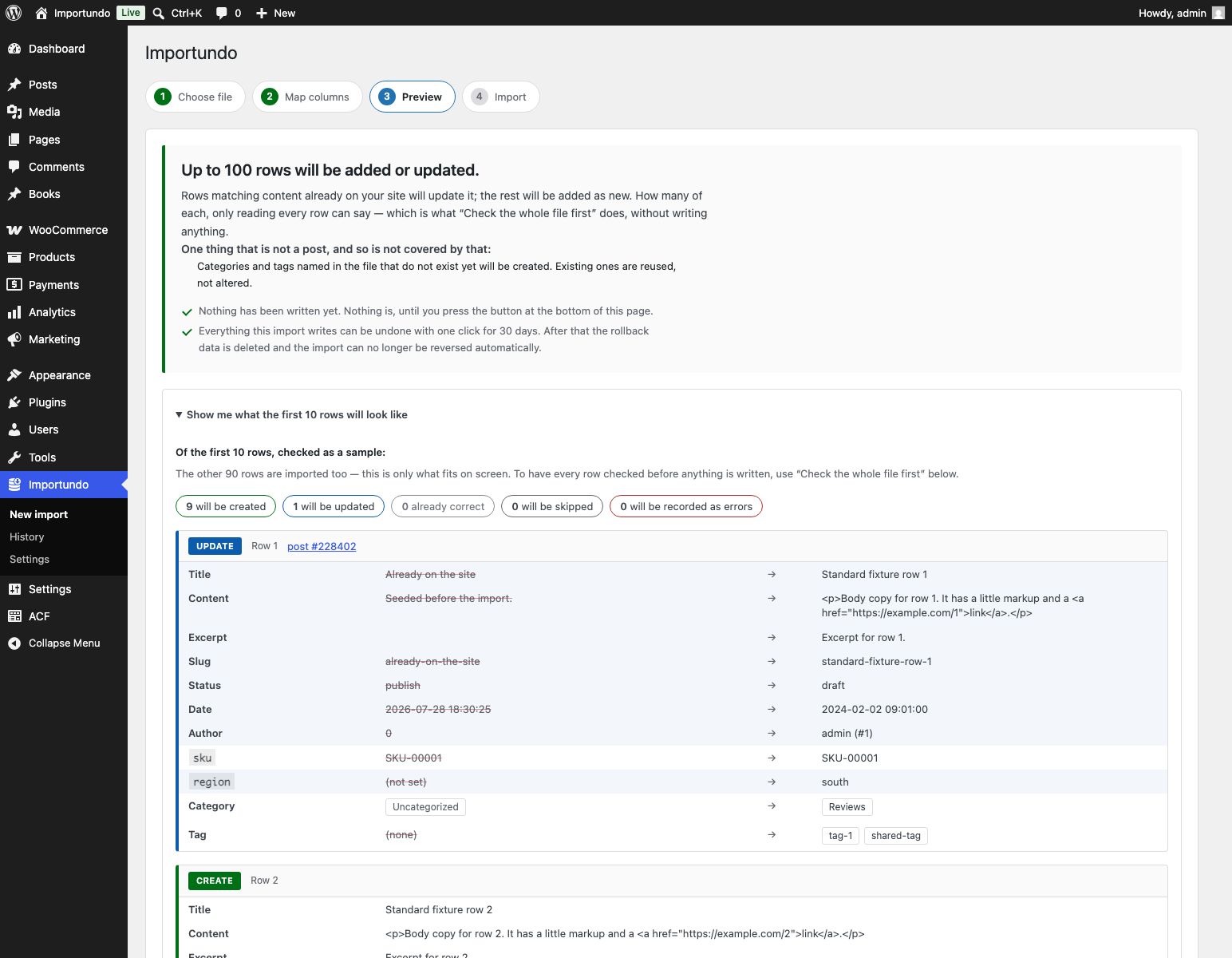
A preview that actually predicts the outcome. Before anything is written, you see the first rows exactly as they will be created — resolved values, not raw cells. Each row is labelled create or update against the matching key you chose, and updated rows show a field-by-field diff of old versus new. Terms that do not exist yet are flagged as new. Image URLs are tested. Nothing is written to your database until you say so.
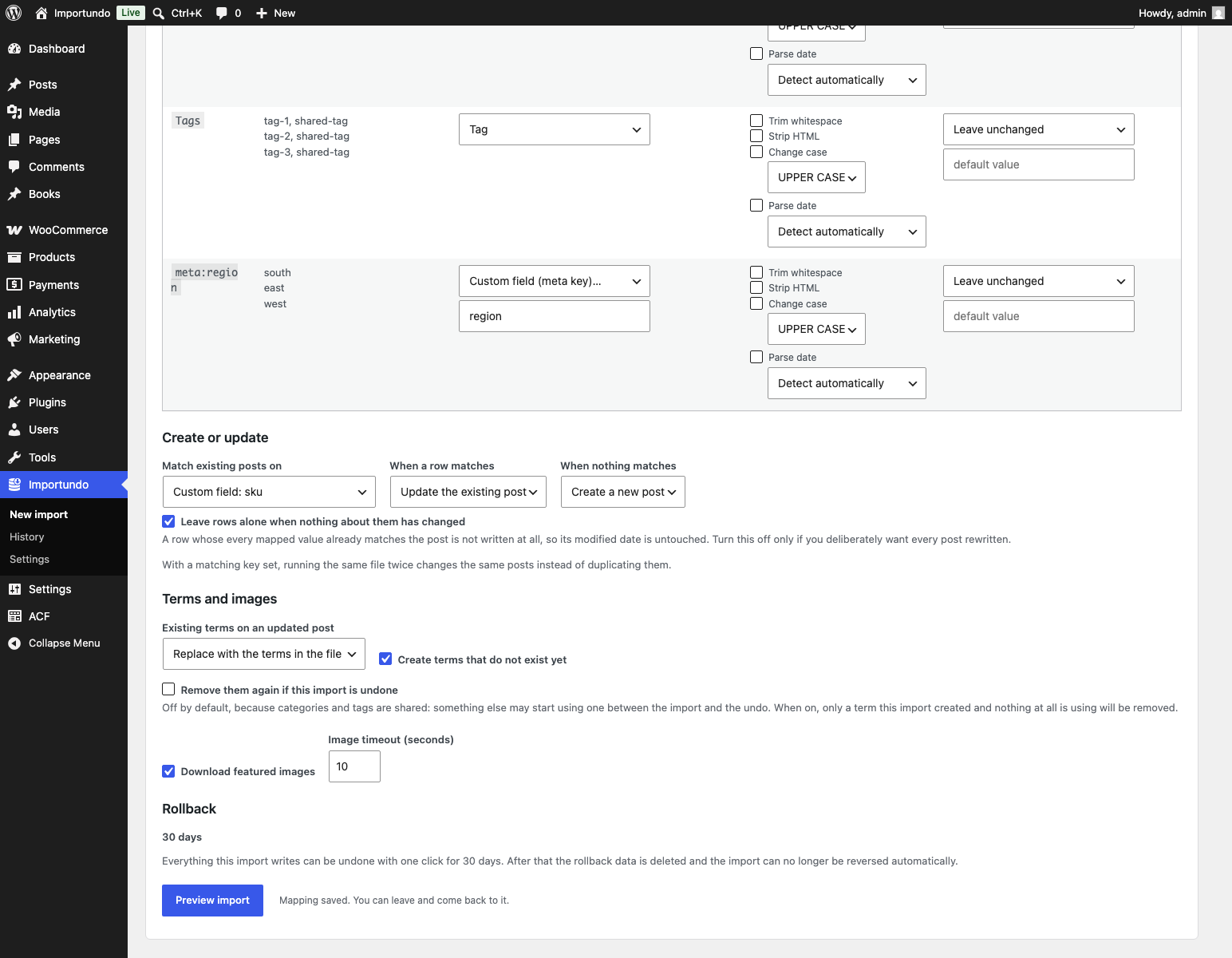
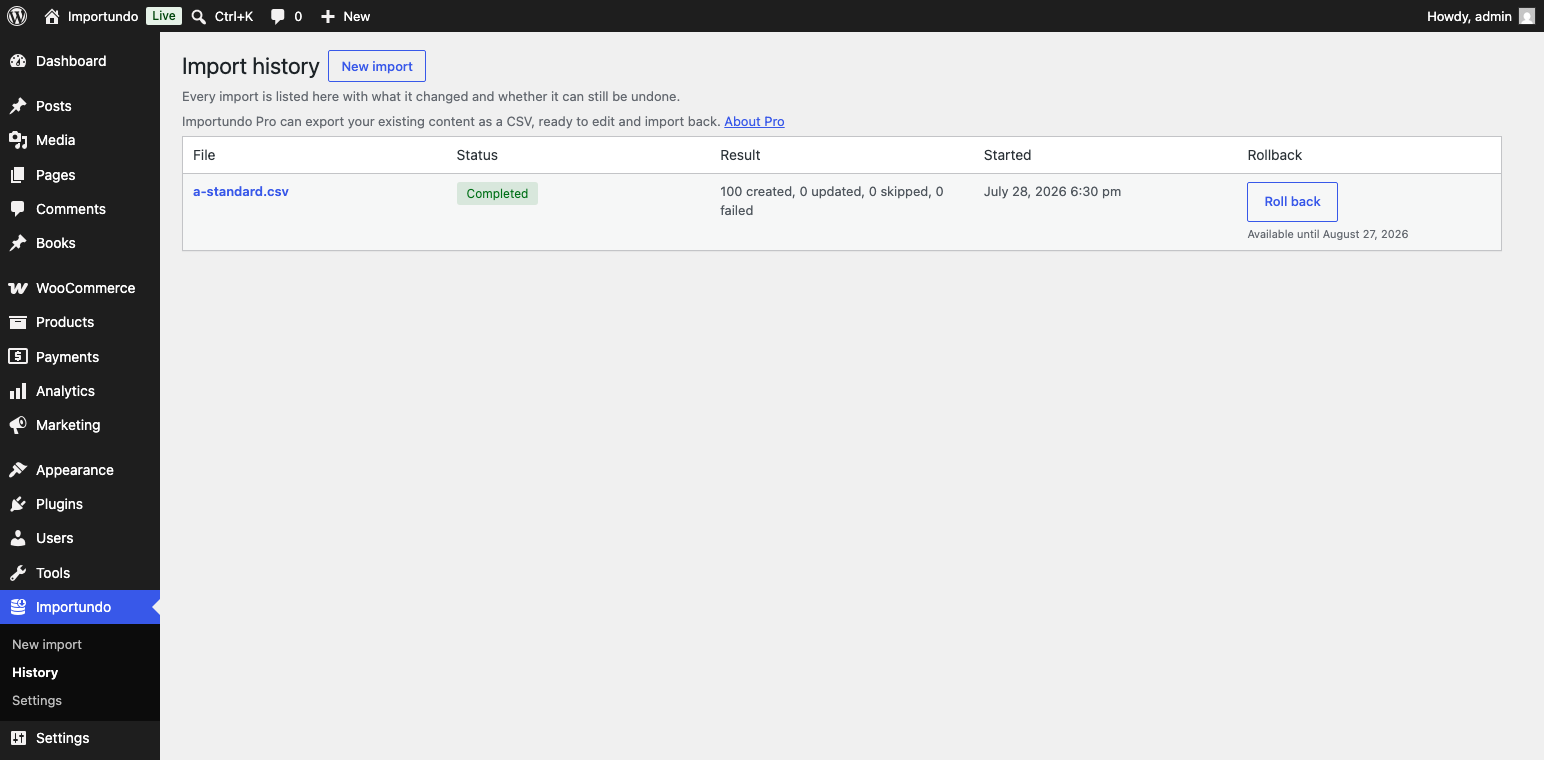
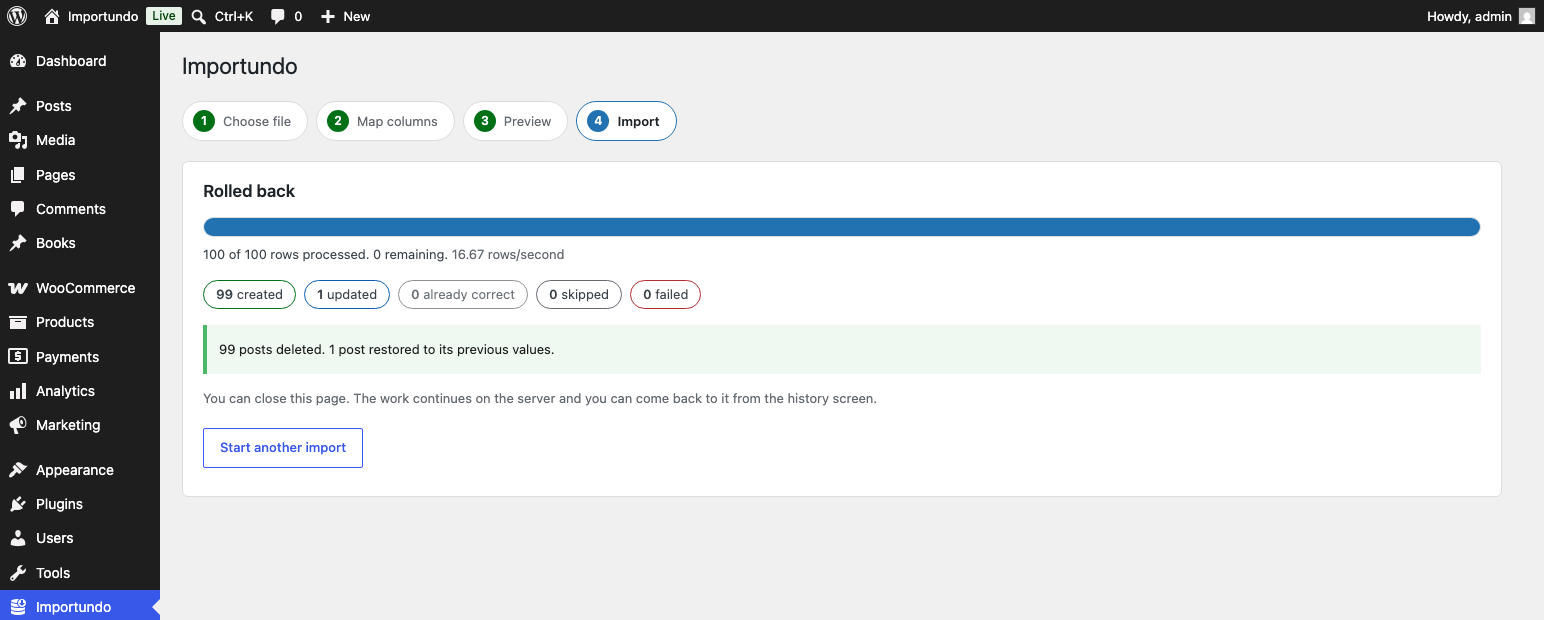
One-click rollback. Every import records what it changed. Undo it and posts it created are deleted, posts it modified are restored to their previous values — including custom fields and taxonomy terms — and you get a report of exactly what was reverted and anything that could not be, such as a post you deleted yourself in the meantime. Rollback data is kept for 30 days. Importundo Pro can set anything from 7 to 365 days.
It does not rewrite what is already right. A row whose every mapped value already matches the post is left completely alone: no write, no modified date changed, no caches cleared. Re-importing a 50,000-row supplier feed in which 200 prices changed touches 200 posts, not 50,000 — and finishes several times faster.
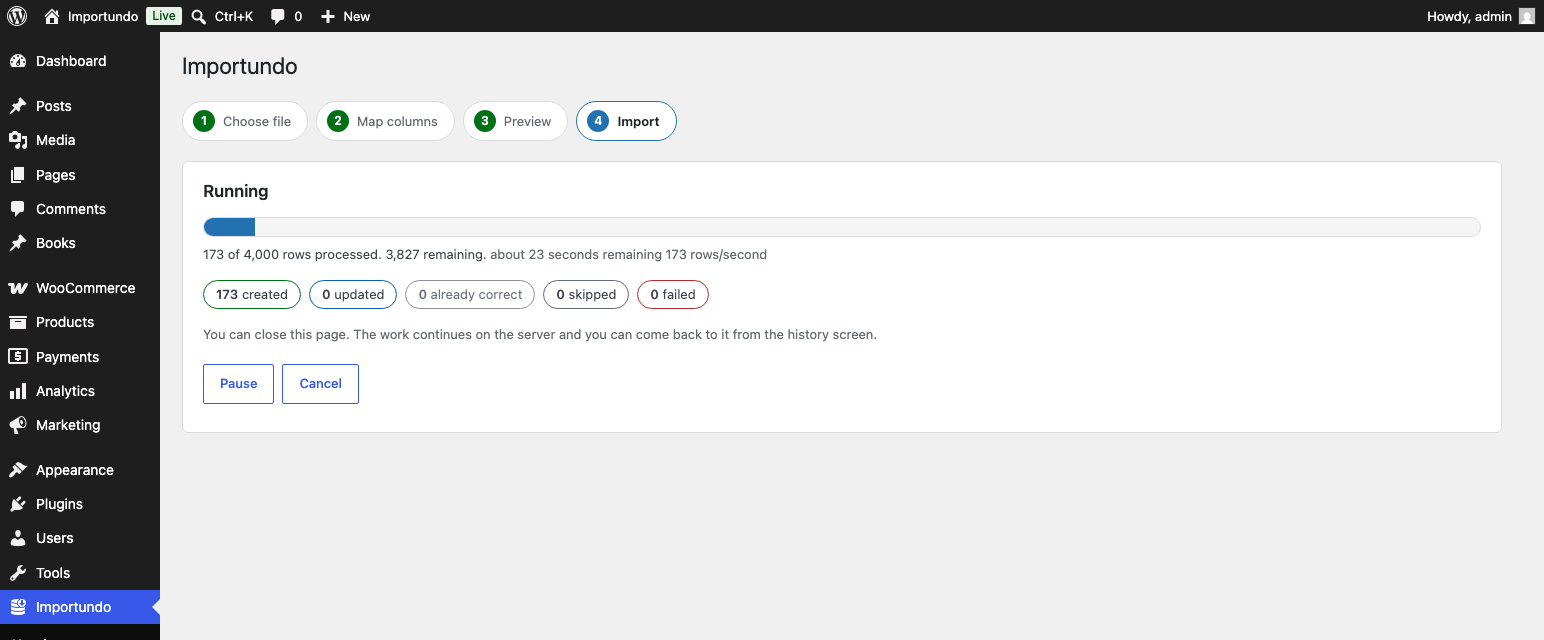
Built for cheap hosting. Imports run in background batches. Close the tab, lose your connection, hit the PHP time limit, restart the server — the import carries on and picks up at the last committed row without duplicating anything. The file is streamed, never loaded into memory, so a 50,000-row import uses about as much memory as a 1,000-row one.
No dependencies. No bundled libraries, no external services, no third-party queue plugin to install alongside it. Background work uses nothing but stock WordPress, and the importer tells you on its settings screen exactly how it is running on your host.
Shop products, as products. A product is not a post with some custom fields on it — write the fields yourself and you get something that looks right in the database and does not exist as far as the shop is concerned: no price, not purchasable, missing from the catalogue. This importer saves products through WooCommerce itself, so prices, stock status and the lookup table every shop query reads are all derived the way WooCommerce derives them. Simple, grouped, external and variable products, variations included. Undo works on all of it.
What it imports
- Posts, pages, and any public custom post type
- Title, content, excerpt, slug, status, date, author, parent, menu order, password, comment and ping status
- Hierarchical and flat taxonomies, including
Parent > Childpaths - Any number of custom fields
- Featured images from a URL, with alt text, deduplicated against your media library
- WooCommerce products: SKU, regular and sale price with a schedule, stock quantity and status, backorders, weight and dimensions, tax status and class, virtual and downloadable flags with their files, purchase note, catalogue visibility, featured, attributes, gallery images, upsells, cross-sells, grouped children, and the external product URL and button text
- WooCommerce variations, written as a row per variation naming its parent by SKU
- Advanced Custom Fields: text, textarea, WYSIWYG, number, range, email, URL, password, colour, select, radio, button group, checkbox, true/false, the date and time pickers, post object, page link, relationship, taxonomy, user, image, file, link, oEmbed and Google Map fields
- ACF Pro’s galleries and repeaters, with Importundo Pro active. Clones and groups are ordinary fields and work without it
Advanced Custom Fields, as ACF reads them back. An ACF field is two rows in your database, not one: the value, and beside it the key that tells ACF which field owns it. Written as plain custom fields the values look perfectly correct in the database and the edit screen shows every field empty. This importer writes them through ACF itself, and translates as it goes — the label you see in a dropdown becomes the value ACF stores, a comma-separated list becomes the list a checkbox field expects, a date becomes the format ACF keeps, and a post or user named by title, slug or email becomes the ID it points at. Undo restores both rows.
Files it copes with
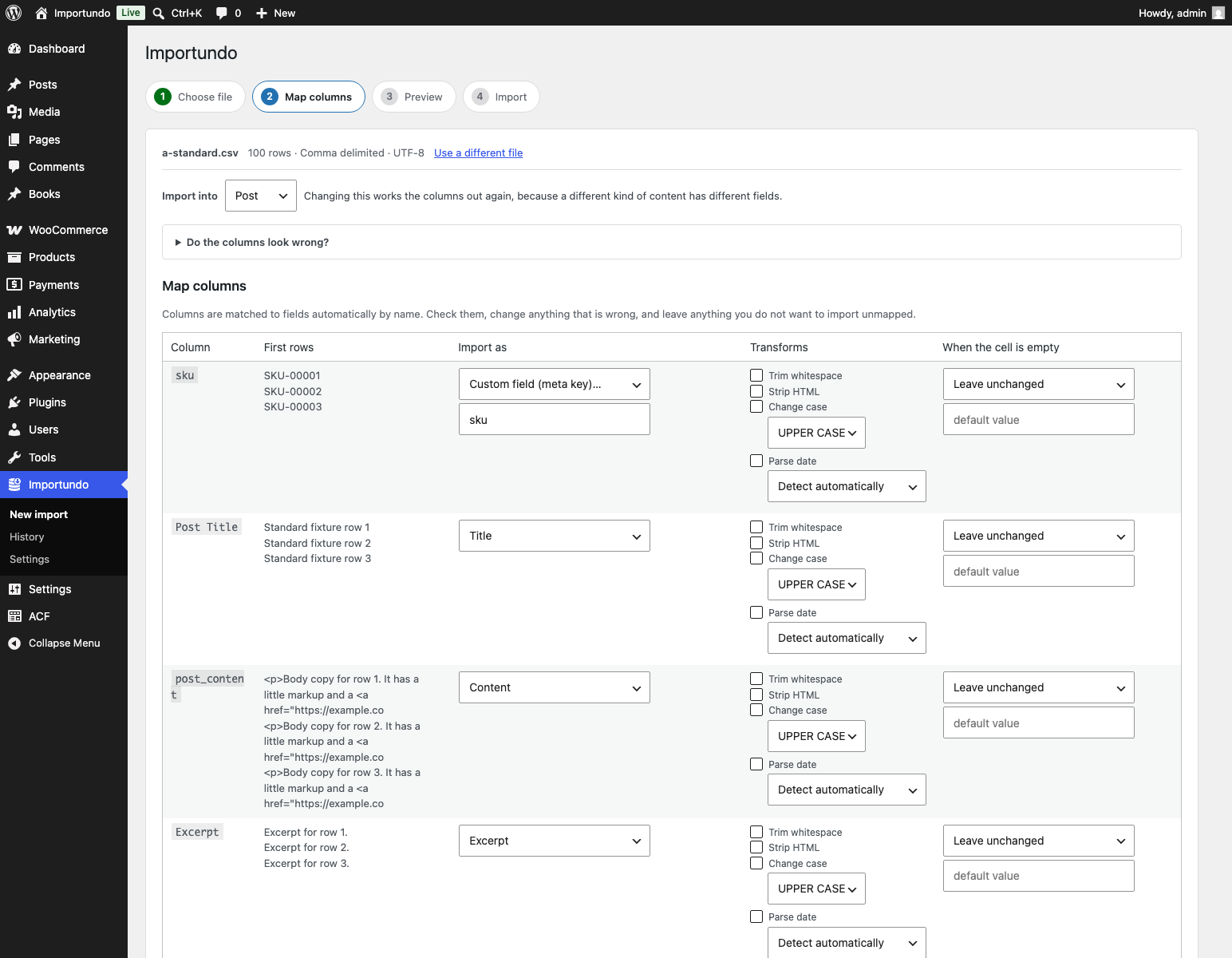
- Comma, semicolon, tab and pipe delimited, detected automatically
- UTF-8, UTF-8 with a byte order mark, and Windows-1252 / Latin-1, transcoded rather than mangled
- Quoted fields containing commas, escaped quotes and line breaks
- Windows and Unix line endings
- Rows with too few or too many columns
- Files with no header row at all
Detection can be overridden by hand whenever it guesses wrong.
Create or update, on your terms
Choose what identifies an existing post — post ID, slug, title, or any custom field — and what to do when a row matches: update it, skip it, or record it as an error. Choose what happens when nothing matches: create, or skip. Choose, per column, whether a blank cell means “set this empty” or “leave it alone”. The default is to leave it alone.
Because matching is on a key you control, running the same file twice changes the same posts instead of creating a second copy of everything.
When rows go wrong
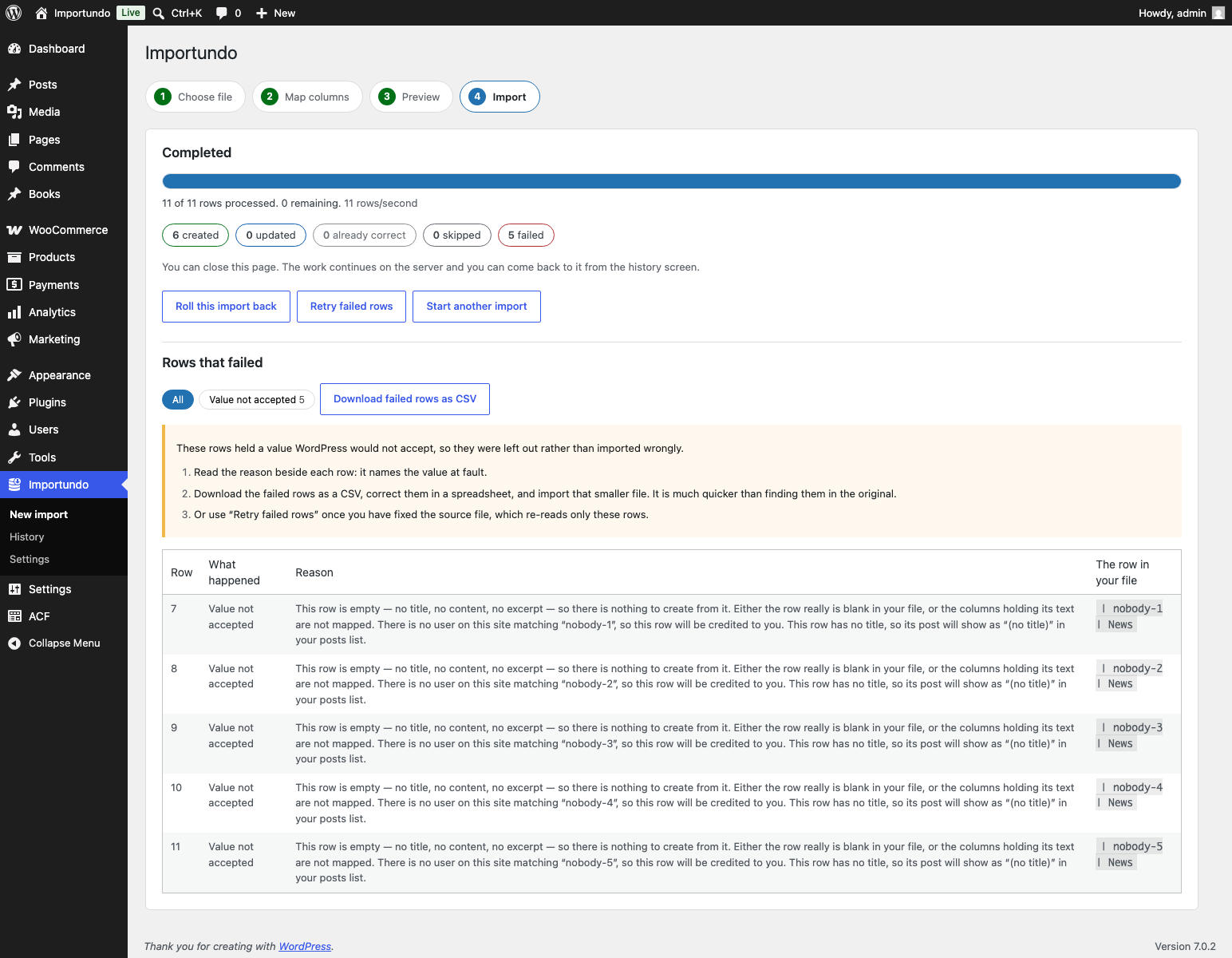
A bad row never stops the import. It is logged with its row number, its raw content, the field that failed and a plain-English reason. Filter the log by error type, export the failed rows as a CSV you can correct in a spreadsheet, or retry just those rows against the same mapping.
And every message tells you what to do next. Not “invalid value” but which value, why it was refused, and the steps that fix it — usually a change in your spreadsheet you can make in a minute. Where the answer really does need your host, you get the question to send them, written so their support team can act on it without you having to know the terminology. The technical detail is there too, folded away, for when somebody asks for it.
Free and Pro
Everything on this page is the free plugin, complete: importing, the whole-file check, the preview, the undo, WooCommerce products and plain ACF fields. There is no account and no licence key, and none of it expires.
Importundo Pro is a separate add-on plugin, sold at importundo.com/pro. It adds:
- Importing straight from a web address, such as a supplier’s feed
- Saved mapping templates — set a file up once, apply it to the next one in a click
- Exporting your content as a CSV that imports straight back
- An undo window of 7 to 365 days instead of the fixed 30
- ACF Pro’s galleries and repeaters
The free plugin never nags about it and works the same beside it as without it.
Privacy
This plugin sends nothing anywhere. There is no telemetry, no license check, no external API. The only outbound requests it makes are downloads of the image URLs in your own CSV, from your own server, and only if you map an image column.
Screenshots
Installation
- Install and activate the plugin.
- Go to Importundo in the admin menu, or Tools Import CSV.
- Drop in a CSV file, check the column mapping, and look at the preview.
- Run the import.
If your file is too large for PHP’s upload limit, upload it to wp-content/uploads by FTP and give the importer the server path instead.
FAQ
-
Will running the same file twice create duplicates?
-
Not if you set a matching key. With a key set — post ID, slug, title or a custom field — the second run finds the posts the first run created and updates them. The second run reports zero created. Without a matching key every row creates a new post, and the importer warns you about that before it starts.
-
What exactly does rollback restore?
-
Posts the import created are deleted permanently, along with images it downloaded for them, unless something outside the import now uses one of those images. Posts the import updated are restored to their previous values for every field the import touched — post columns, custom fields and taxonomy assignments — including
post_modified, so the row goes back to exactly what it was.Rollback does not restore anything the import never touched, and it cannot restore a post you deleted yourself after the import ran. The report tells you when that happened.
-
How long can I roll back for?
-
30 days. The window is shown on screen before you start, not buried. When it expires, only the rollback data is deleted — your imported content is untouched. Importundo Pro can set the window to anything from 7 to 365 days, globally or per import.
-
My import stopped part way. What now?
-
It did not stop; it is queued. Imports run in background batches, so a closed tab, a dropped connection or a PHP timeout does not end them. Open Importundo History to see where it is. A watchdog checks once a minute for imports that have stopped making progress and restarts them, so even a fatal error or a server restart only costs a minute.
-
How does it run imports in the background?
-
Three ways, in order of preference, all using stock WordPress:
- As each batch finishes, the site sends itself a quick request asking for the next one. This is the normal path and needs nothing configured.
- If your host blocks a site from calling itself, WP-Cron takes over, plus a once-a-minute check that restarts anything stalled.
- If your host allows neither, the import screen drives the work itself while it is open, and says so on screen.
Importundo Settings shows which of these applies to your server, and there is a Test again button for after you change a firewall or security setting.
If the first way is unavailable, the settings screen also says why — a login prompt in front of the site, a security plugin, a certificate problem, a firewall — and what to do about it. Three of the four common causes you can fix yourself.
-
That is what it is built for. The performance target is a 50,000-row file completing on PHP 7.4 with a 128 MB memory limit and a 30 second execution limit, with no shell access and no WP-CLI. Batches stop themselves before they reach either limit and queue the next one.
-
Can it import WooCommerce products?
-
Yes, if WooCommerce is active. Choose Products as the target and the mapping screen offers the product fields — SKU, regular and sale price, stock, dimensions, tax, attributes, gallery, upsells and the rest — alongside the usual title, content and categories.
Products are saved through WooCommerce rather than written as post meta, which matters more than it sounds: WooCommerce derives the active price, the stock status and the row in its lookup table from the values you set, and a product missing those is invisible to the shop while looking perfectly correct in the database.
Variable products are described as a parent row followed by one row per variation, each naming its parent by SKU. Set the matching key to SKU and a second run updates the same products and the same variations instead of duplicating them.
-
Does it import Advanced Custom Fields?
-
Yes, if ACF is active. Choose the content type and the mapping screen lists that type’s ACF fields under their own heading, labelled the way your field group labels them, so a column called “Page count” maps itself.
Values are written through ACF rather than as custom fields, which matters for the same reason it does with products: ACF stores a second row beside every value saying which field it belongs to, and a value without it shows up as an empty field on the edit screen. It also translates as it writes — your spreadsheet says “Hardback” where the field stores “hb”, says “Print, Audiobook” where the field stores a list, and says 15/01/2024 where the field stores 20240115.
-
What about ACF Pro’s repeaters and galleries?
-
Both work with Importundo Pro active; the free plugin says so on the field and leaves it alone rather than half-writing it. A gallery is a column of web addresses, separated by commas, in the order the gallery should show them; each is downloaded into your media library and one already there is reused.
A repeater is mapped a column per field inside it, rather than as a whole. Each column holds that field down the rows, separated by a vertical bar, and the rows are rebuilt by position — so three columns reading
One | Two | Three,10|20|30andProse|Verse|Prosebecome three rows. That is also the shape a spreadsheet exports a list in, so the columns are often already there. Ragged columns are fine: the row count comes from the longest one, and a missing value is simply empty.Clone and group fields need nothing special. ACF stores what they contain as ordinary fields, so that is how they are offered — under the names ACF actually writes, including the prefix when a clone adds one.
Flexible content is the one that is not imported. Every row picks its own layout and each layout has its own fields, so a fixed set of columns cannot say which layout row three is — and a file that got that wrong would not fail, it would quietly build the wrong page. The importer says so rather than guessing.
-
Does it need WooCommerce?
-
No. WooCommerce support appears only when WooCommerce is active; without it the importer works exactly as it does for posts and custom post types. This plugin bundles nothing from WooCommerce and does not modify it.
-
Can it export?
-
With Importundo Pro, yes: Importundo History gets an Export button for each kind of content, and the file it produces is designed to be imported back — the column names are the ones this importer maps automatically, and the post ID is included so the round trip updates rather than duplicates. The free plugin still exports the failed rows of an import, the full row log, and the current values of anything an import is about to change.
-
Is there a paid version?
-
Yes, Importundo Pro — a separate add-on that adds importing from a web address, saved mapping templates, content export, a longer undo window, and ACF Pro’s galleries and repeaters. The free plugin is complete without it and never nags. Versions up to 1.2 included some of those features; 1.2 keeps working as it is if you stay on it, and the changelog says exactly what moved.
-
Where are uploaded files stored?
-
In a randomly named directory inside
wp-content/uploadsthat is protected against direct web access by.htaccess,web.configand an index stub, with randomised filenames. Uploads are deleted when their import finishes, or when the rollback window expires. Files you point to by server path are never deleted — they are yours. -
Which user do imported posts belong to?
-
Whoever the author column says, matched by user ID, login, or email address. Rows whose author cannot be matched are attributed to the user who started the import, and the preview warns you first.
Reviews
There are no reviews for this plugin.
Contributors & Developers
“Importundo” is open source software. The following people have contributed to this plugin.
Contributors
Translate “Importundo” into your language.
Interested in development?
Browse the code, check out the SVN repository, or subscribe to the development log by RSS.
Changelog
2.0.0
- Some features moved to Importundo Pro, a separate paid add-on: importing from a web address, saved mapping templates, the content export on the history screen, the adjustable undo window (free is now a fixed 30 days), and ACF Pro’s galleries and repeaters. This funds the plugin’s development. Nothing else changed: importing, the whole-file check, the preview, the undo, WooCommerce products and plain ACF fields are all still free, and still work exactly as before.
- If you rely on one of the moved features and do not want Pro, stay on 1.2.0 — it keeps working. This release removes the moved code rather than locking it, so the free plugin ships nothing it will not do.
- The exports that support safety stay free: failed rows, the full row log, and the current values of what an import is about to change.
- New hooks for add-ons: importundo_features, importundo_accept_url_source, importundo_template_lookup, importundo_retention_bounds, importundo_history_exportbar, importundo_admin_menu, importundo_acf_row_types, importundo_acf_preparers.
1.2.0
- ACF Pro’s galleries and repeaters. A gallery is a column of addresses; a repeater is a column per field inside it, with the rows separated by a vertical bar and rebuilt by position. Clone and group fields are offered as the ordinary fields ACF stores them as. Flexible content is refused with its reason, because a fixed set of columns cannot say which layout each row is.
- Advanced Custom Fields. ACF fields appear on the mapping screen under their own heading, with their own labels, and are written through ACF so that the values are the ones ACF reads back — the choice behind a label, the list behind a comma-separated cell, the date in the form ACF keeps, the ID behind a title. Rollback restores them. Fields that hold other fields are refused with a reason rather than half-written.
- A cell an ACF field will not accept is now reported by the preview, before anything is written, rather than in the log afterwards.
- Fixed: a row whose only change was a WooCommerce attribute, gallery or related-product list was reported as already correct and silently not applied. Those rows are now written.
- WooCommerce products. Simple, grouped, external and variable products with their variations, saved through WooCommerce so that prices, stock status and the shop’s own lookup table are derived correctly rather than written blind. SKU, prices with a sale schedule, stock, dimensions, tax, attributes, gallery, downloads, upsells and cross-sells. Rollback covers all of it.
- The target content type can be changed from the mapping screen. It used to be fixed before you had seen a single column name, so a product file imported as blog posts and the price columns had nowhere to go. If the columns look like something other than what is selected, the importer now says so and offers to switch.
- Fixed: choosing a custom field as the matching key no longer requires a reload — the list of possible keys is rebuilt as soon as a column is mapped to one.
- Fixed: the mapping screen accumulated a duplicate event listener on every redraw, so a change could be handled several times over.
- Uploaded files are now handed to WordPress’s own upload handling, which applies its file type checks before the file is stored.
1.1.0
- Check the whole file first. Every row resolved exactly as the import resolves it, nothing written, with counts, the rows that would fail, and the categories that would be created. One click runs it for real.
- Rows that would change nothing are no longer written. No modified date stamped, no caches cleared, no undo data stored. A no-op re-import is several times faster.
- Export. Download your content as a CSV that imports straight back without mapping.
- Before an import that overwrites anything, the count of posts it will change is shown, along with the offer to download what those posts hold today.
- Undoing an import can now remove the categories and tags it created, if you ask it to — and never one that anything else has started using.
- WP-CLI:
wp importundo import,list,status,rollback,retry. - Fixed: undoing an import that updated posts used to leave the revisions behind, so the site was not quite as it had been.
1.0.1
- Every error and warning now says what you can do about it, not only what went wrong, with the steps most likely to help first.
- When a site cannot make background requests to itself, the importer works out why — a login prompt, a security plugin, a certificate, a firewall — and gives the matching advice, plus a Test again button.
- Where the fix genuinely needs your host, you get the question to send them, ready to copy.
- The error log explains each kind of failure once, above the rows it applies to, instead of repeating the same sentence against every row.
- Large imports say how long undoing them will take before you start.
1.0.0
- First release: CSV import for posts, pages and custom post types, dry-run preview, chunked resumable execution, per-row error log, saved mapping templates and full rollback.