

Description
LocalForm is a form builder for WordPress. Add your questions, drag them into order, pick your colors, and hit publish. Your form gets its own page and a link you can share right away – no page building, no shortcode wrangling, no fighting your theme’s CSS.
The name says what it does: every response stays local, on your own site, under your own domain and branding. Nothing is sent to a third-party form service, so you stay in control of your visitors’ data. And there is nothing to set up before your first form is live – install, activate, and start building.
If you have been collecting answers with a cloud form service such as Google Forms or Microsoft Forms, LocalForm covers the same ground – write your questions, share a link, read the results back as a summary – except the form lives on your own domain and the answers never leave your site.
What you can build
- Contact forms. Name, email and a message, with an email in your inbox every time someone writes in. Start from the template and publish in a minute.
- Surveys and feedback forms. Ask your questions and read the results back as a summary with counts and charts, right in the admin.
- Sign-ups and intake forms. Collect the details you need and get an email every time someone submits.
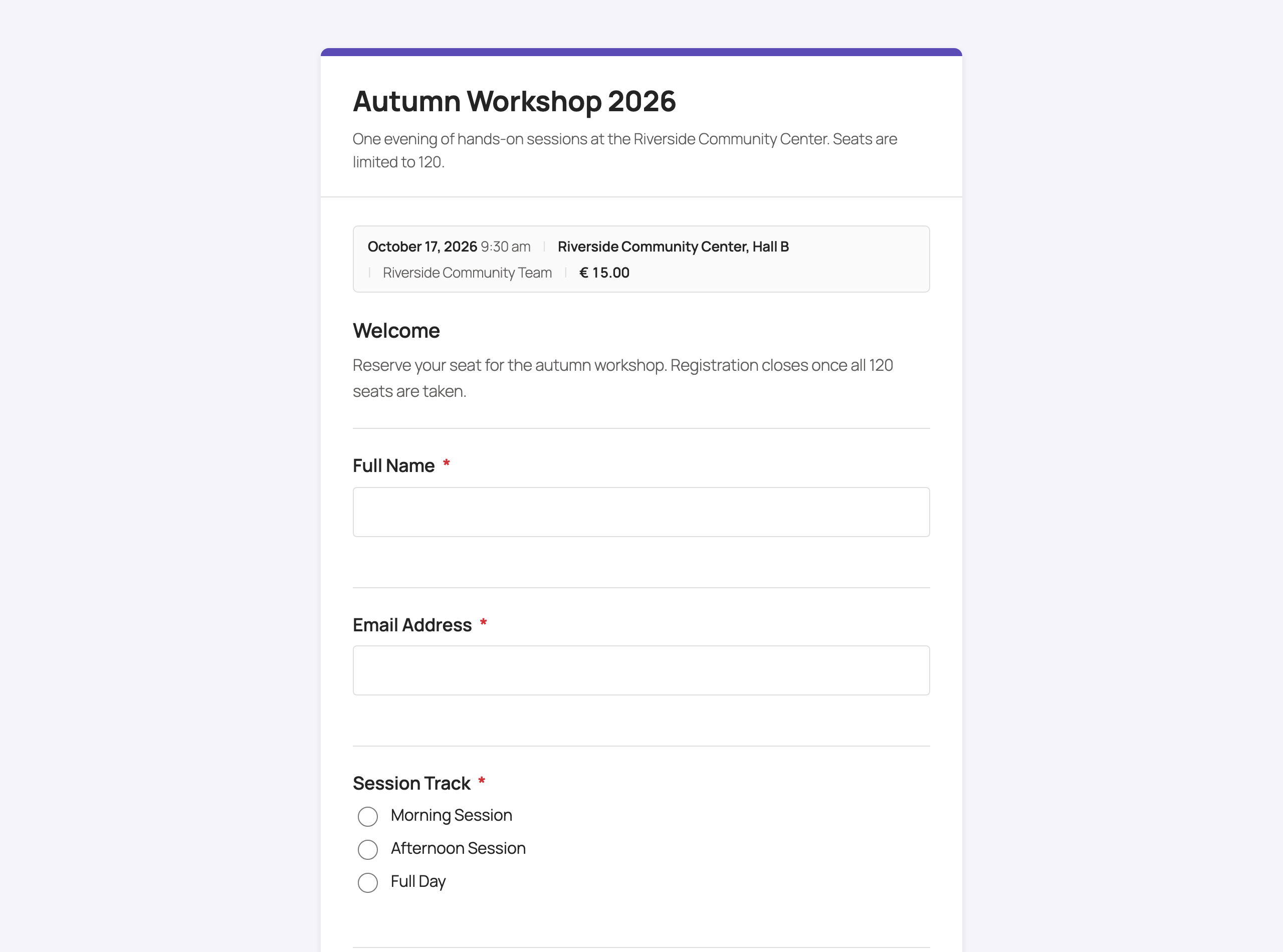
- Event registrations. Set the event date, time, location, organizer and price, cap the number of registrations, open and close the form on a schedule, and send every registrant a confirmation email.
Why LocalForm?
- Simple to use. A distraction-free builder: add questions, drag to reorder, pick your colors, publish.
- Share a link. Every form gets its own page with a URL you choose – or drop it into an existing page with a shortcode or block.
- Your data stays yours. Responses are stored on your own site and can be downloaded as an Excel file whenever you like.
- No surprises. No account, no license key, no trial period, and no limit on the number of forms or submissions.
- Nothing calls home. No analytics, no telemetry, and fonts are served from your own domain – so building a form never sends your visitors anywhere else.
- Works with AI assistants. Built-in MCP support lets an assistant like Claude build and edit your forms for you, on your own site – see below.
Features
Building forms
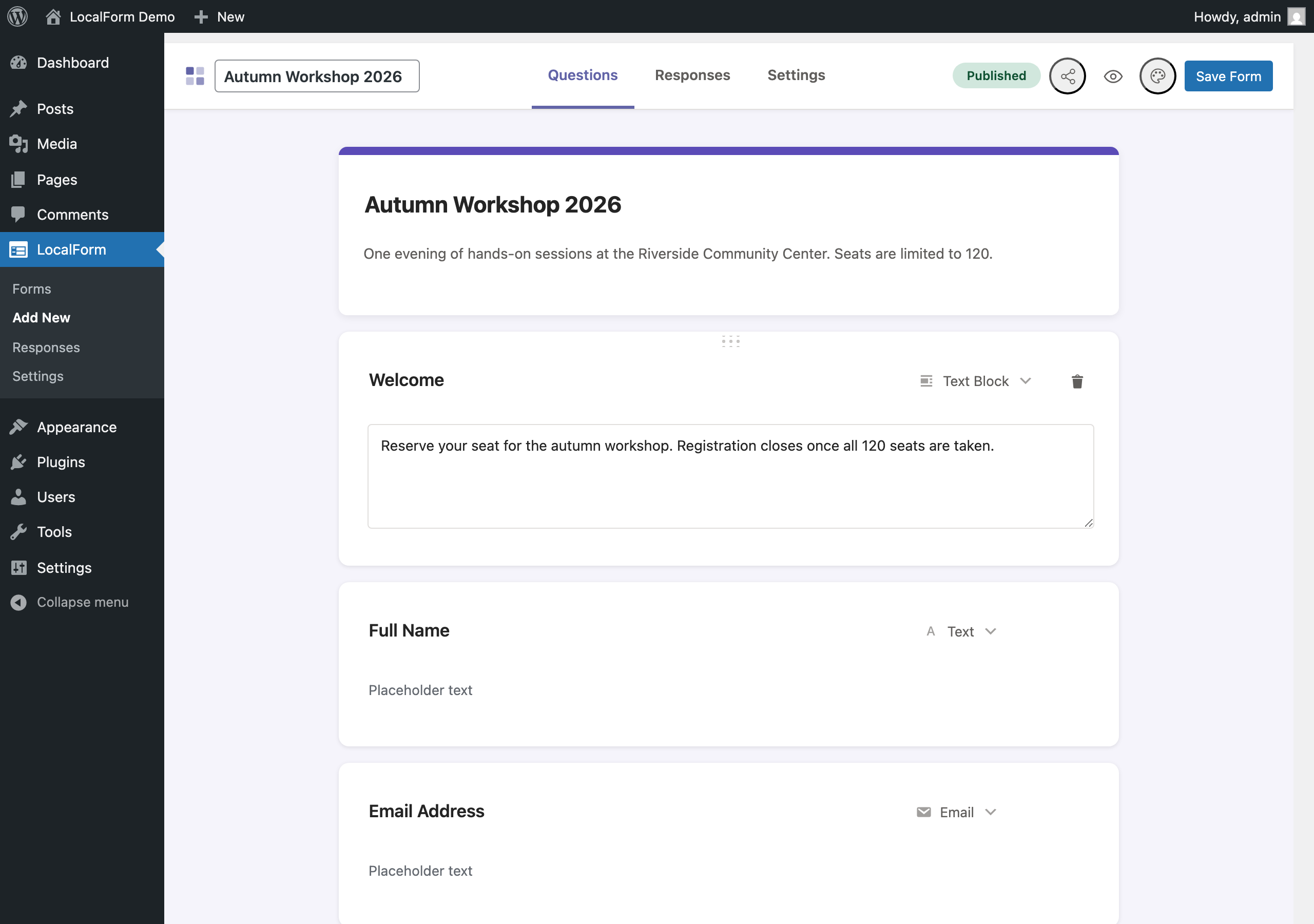
- Drag-and-drop builder in the WordPress admin – no code, no page builder needed.
- Starter templates for a contact form, a feedback survey, an event registration and an RSVP – they open the builder with the questions already written, and every one of them stays editable. Nothing is saved until you hit Save.
- Question types: text, long text, email, phone, number, dropdown, single choice, checkboxes, consent, date, date range and rating.
- A consent question renders as a single tick box with your own wording beside it – put a link to your privacy policy in it and require it before the form can be sent.
- Add section titles, text and images between questions to explain or break up a long form.
- Choose the colors and the font; pick from seven bundled font families.
- Organize your forms with tags and filter the forms list by them.
- Light mode hides the webhook URL, the redirect URL and the custom fields on a form’s Settings tab, for a builder that shows only the questions – per form, or as the default for new forms.
Sharing your form
- Every form gets its own page at a web address you choose.
- Place a form inside an existing page or post with the
[localform id="123"]shortcode or the LocalForm block. - Share dialog in the builder: copy the link, copy the embed code, or download a QR code for print and posters.
- Forms are shown full-screen by default, or in your theme’s normal page layout if you prefer.
Collecting responses
- Visitors get instant validation and a thank-you message you can write yourself, without the page reloading.
- Get an email whenever someone submits, and send the person who submitted a confirmation email you can customize with their answers.
- Cap the number of registrations and set an opening and closing date and time, with your own message shown when the form is full or closed.
- Built-in spam protection: a hidden trap field that differs per site and rotates daily, a check that the submission came from a real browser, rate limiting, blocking for repeat bot attempts, and duplicate-submission checks.
Reading and keeping your results
- Browse every submission per form in the admin.
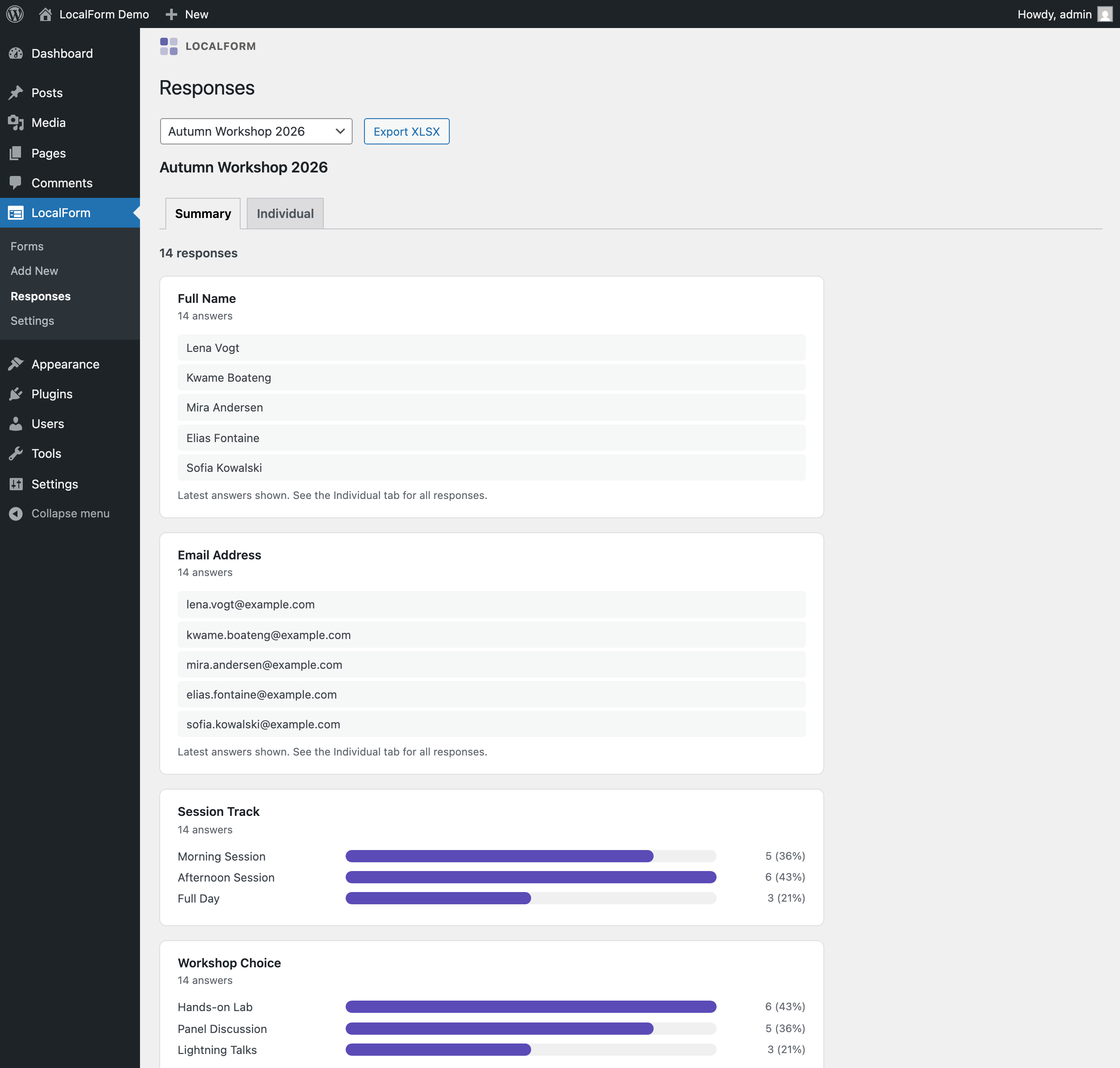
- Summary view per question: counts and bar charts for choice questions, lowest/average/highest for numbers, per-day counts for dates, and the most recent answers for open questions.
- Download all responses as an Excel (XLSX) file.
- Back up every form, submission and setting to a single file, and restore it here or on another site.
Connecting to other tools
- Send each submission to a web address of your choice (a webhook), to plug LocalForm into your own system or an automation tool like Zapier, Make or Power Automate.
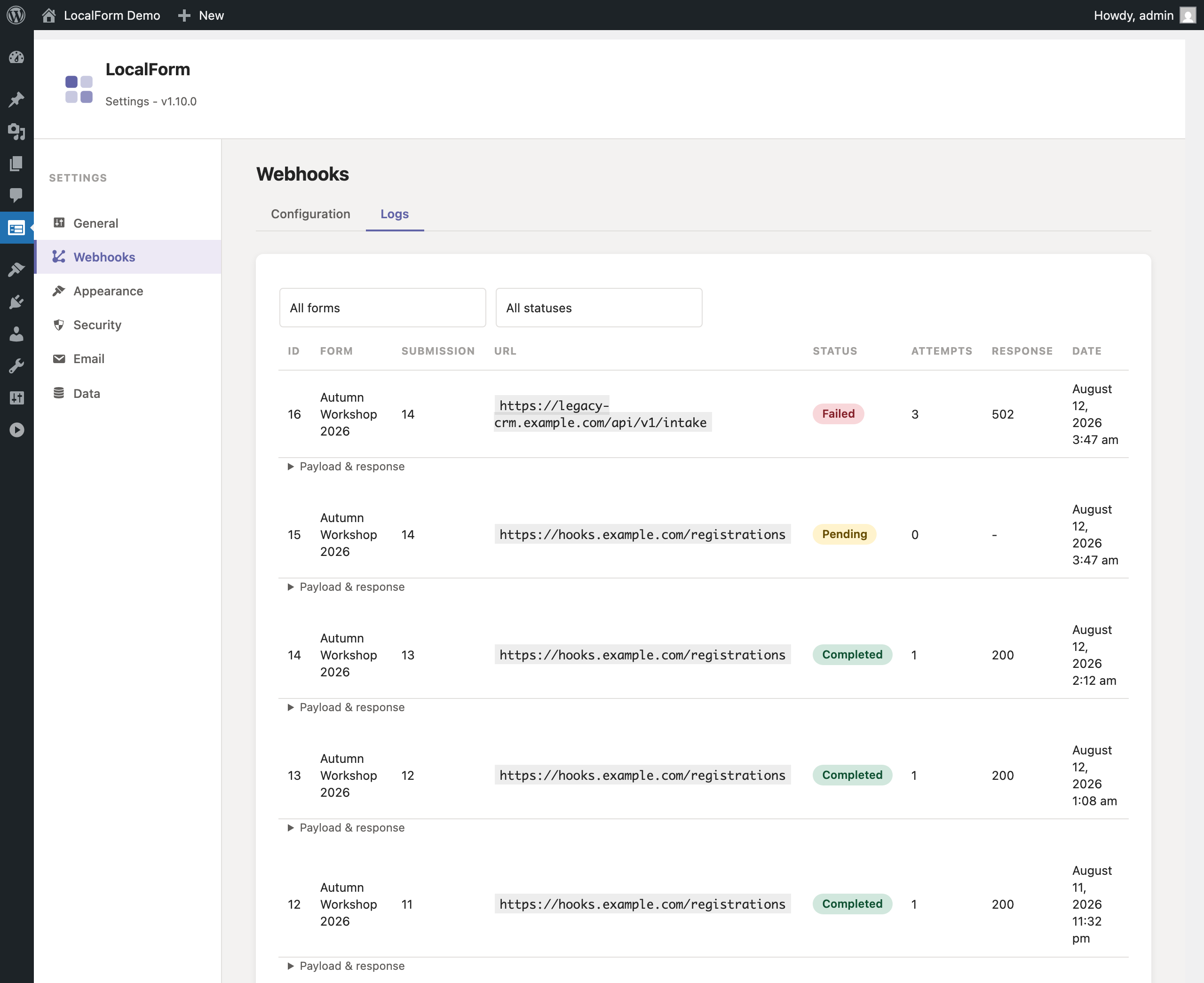
- Requests are signed and retried automatically if the receiving end is down, with a log of the last 30 days so you can see what went out.
- Optionally skip saving submissions entirely and only send them onward.
- REST API for a form’s field structure, for developers building a custom renderer or syncing form definitions into another system. Authenticated with WordPress Application Passwords.
Building forms with an AI assistant (MCP)
LocalForm speaks MCP – the Model Context Protocol – so an AI assistant such as Claude can build your forms for you. Ask for “a registration form for the summer school on 12 and 13 August, with a student rate”, and the form is created on your site, with its page, ready for you to review.
- Three WordPress Abilities are registered – list forms, read a form, and create or update one – and become MCP tools as soon as the MCP Adapter plugin is installed.
- It is your site doing the work. The assistant connects to WordPress; LocalForm sends nothing out, and no form or response is uploaded anywhere.
- Everything goes through the same validation as the builder, so an assistant cannot save something you could not have built by hand, and reconfiguring a form never touches the responses already collected.
- Sign in with an Application Password and the usual WordPress permissions apply: only an administrator can read or change a form.
LocalForm Pro
Everything described above is in the free plugin and stays that way – none of it is a trial, a teaser or a limited version. LocalForm Pro is a separate paid add-on for the sites that need more, sold at localform.dev and installed alongside the free plugin. If none of the following applies to you, you are not missing anything.
- Payments. Charge for a registration and collect the money at submit, through Mollie – iDEAL, Bancontact, card, whatever your Mollie account has enabled. The response is saved before the payment starts, so an abandoned checkout still leaves you a registration to chase rather than nothing at all. Paid, unpaid and abandoned are all visible in Responses and in the XLSX export.
- Build with AI. Describe the form you want, in your own words, and watch it built on your site – on the forms list for a new form, or docked beside the canvas for a change to the one you are editing. The free plugin’s MCP support covers the same ground from an outside assistant; this is the same three abilities driven from inside the admin.
- Conditional fields. Show a question only when another answer matches a rule, enforced both in the browser and on the server.
- More event detail. Several dates per event, each with its own start and end time and its own count, and a labelled price list so adults, students and members can be charged different amounts.
- More question types. A File Upload field, stored outside the public media library and downloadable only by admins; a Yes/No switch built to drive conditional logic; and a one-click Invoice Details block of billing questions that appears only when that switch is on.
- Webhook and field controls. Reusable global webhook fields carrying real JSON types, field name rules that keep the same concept arriving under the same name from every form, reusable field templates, and prefill from URL parameters.
- Elementor widgets. Drop a form on any Elementor page, or list every upcoming event with a register link per date that opens the form with that date preselected.
The Pro add-on is not hosted on WordPress.org; it is documented at docs.localform.dev.
LocalForm is fully translatable, with translations contributed through translate.wordpress.org.
External services
This plugin does not connect to any external service on its own. It contains no analytics, telemetry, license checks or remotely hosted assets.
The MCP support described above adds no outbound request either: it registers WordPress Abilities, which an AI client calls by connecting to this site over the REST API, authenticated as a WordPress user. The plugin never contacts an AI provider, and holds no API key for one.
The one outbound request it can make is entirely under your control: if you enter a webhook URL on a form (or as the site-wide default under Forms > Settings > Webhooks), each submission is POSTed as JSON to that URL, signed with HMAC-SHA256. That destination is chosen and operated by you – the plugin has no default endpoint and sends nothing anywhere if no webhook URL is configured. The payload contains the submitted answers, the form title and ID, the event details you set on the form, and any custom fields you added. Consult the privacy policy and terms of the service you point the webhook at, since they are the party receiving the data.
Screenshots
Blocks
This plugin provides 1 block.
- LocalForm
Installation
- In your WordPress admin, go to Plugins > Add New, search for “LocalForm”, and click Install Now. Or upload the plugin files to
/wp-content/plugins/localform/. - Activate the plugin through the ‘Plugins’ screen in WordPress.
- Go to ‘Forms’ in the admin menu and click ‘Add form’ to build your first one.
- Publish the form and use the Share button to copy its link.
FAQ
-
Do I need an account or a license key?
-
No. There is no sign-up, no license key and no trial. Install the plugin and everything described here works straight away, with no limit on the number of forms or submissions.
-
Is there a paid version, and what does it add?
-
Yes – LocalForm Pro, a separate add-on sold at localform.dev. Nothing in the free plugin is limited, gated or timed to push you towards it: no submission cap, no form cap, no trial and no license key, and that is not going to change. Pro is for sites that need things the free plugin deliberately does not do – taking payment for a registration through Mollie, showing a question only when another answer matches a rule, several dates or several price tiers on one event, file uploads, a “Build with AI” panel inside the admin, Elementor widgets, and a set of webhook and field-naming controls for wiring forms into another system. The full list is under “LocalForm Pro” in the description above, and the documentation is at docs.localform.dev.
-
Does the plugin nag me?
-
Once, and only if you want it to. After your site has collected 25 responses, LocalForm asks on its own screens whether you would leave a review – with “Not now” and “Don’t ask again” next to it, both remembered. Untick “Ask for a review on WordPress.org” under Settings > General and it never asks. Nothing else in the plugin interrupts you, and nothing is reported back to us either way.
-
Can I use this instead of a cloud form service?
-
That is what it is built for. If you are used to Google Forms, Microsoft Forms or a similar service, you will recognise the way LocalForm works: add your questions, publish, share the link, and read the answers back as a summary. The differences are that the form sits on your own domain and carries your own branding, the responses are stored on your site rather than in someone else’s account, and your visitors are not sent to a third-party page to answer. LocalForm is not affiliated with, or endorsed by, any of those services.
-
Can I build a poll or a quiz?
-
For a poll, yes – a single Single Choice or Checkbox question works well, and the Responses summary gives you counts and a bar chart per option without any extra setup. LocalForm does not do scored or graded quizzes (there is no “correct answer” or points system); if that is what you need, it is the one thing to look elsewhere for.
-
Where do my responses go?
-
They are saved on your own site, in your own WordPress database, and only you can see them. LocalForm does not send them to any form service, and there is no dashboard elsewhere holding a copy.
-
Does LocalForm help with GDPR?
-
Keeping responses on your own server, under your own hosting agreement, is a real advantage for data residency and minimisation compared with routing them through a third-party form service. For the consent side there is a Consent question type: one tick box, your own wording next to it, a link to your privacy policy if you want one, and the answer stored with the response so you can show what was agreed to and when. That said, LocalForm cannot certify your site as “GDPR compliant” by itself – that still depends on things you configure yourself, such as what you ask for, how long you keep it (see “Keep my data when the plugin is deleted” under Settings > Data), your own privacy policy, and any consent you need before collecting personal data. There is no telemetry or third-party call for a submission to leak through in the first place.
-
Do I have to start from a blank form?
-
No. The Forms screen has a “Start from a template” row with a contact form, a feedback survey, an event registration and an RSVP. Picking one opens the builder with the questions already written – rename them, reorder them, delete the ones you do not want. Nothing is written to your site until you press Save, and a saved form keeps no link to the template it started from.
-
How do people find my form?
-
Every form gets its own page with a web address you choose – just share that link, by email, on social media, or as the QR code you can download from the Share button. You can also place the form inside a page or post you already have.
-
Can I put a form in an existing page?
-
Yes. Add the LocalForm block in the block editor, or paste the
[localform id="123"]shortcode. The form’s own page keeps working at the same time. -
Do I get an email when someone fills in my form?
-
Yes. Each form can email you on every submission, and can also send the person who submitted a confirmation email. You can write that message yourself and drop their answers into it – for example the form title, the event date, or any question you asked.
-
Can I stop taking registrations after a certain number, or on a certain date?
-
Yes. Set a maximum number of registrations and/or an opening and closing date and time per form. Once the form is full or closed, visitors see a message you write instead of the form. The maximum requires responses to be saved in WordPress.
-
Will the form match my site’s design?
-
You choose the colors and font for each form, and forms are shown on a clean full-screen page by default so nothing in your theme gets in the way. If you would rather the form sit in your theme’s normal page layout, there is a per-form setting for that.
-
How do you stop spam submissions?
-
LocalForm uses a hidden trap field that real visitors never see, limits how often the same visitor can submit, and blocks accidental duplicate submissions. You can adjust all three under Forms > Settings > Security.
-
Can I get my responses into Excel?
-
Yes. The submissions screen for each form has a download button that gives you an XLSX file of every response.
-
Can I move my forms to another site?
-
Yes. Under Forms > Settings > Data, “Download backup” gives you a single file with every form, its submissions and your settings. Upload that file on any other site running LocalForm to bring everything across. If a form already exists there, you choose whether to keep it or replace it with the backed-up one – so restoring the same file twice never duplicates your responses. Webhook logs are not included in the backup.
-
What happens to my forms if I delete the plugin?
-
Deactivating LocalForm never touches your data. Deleting it removes everything by default – your forms, responses and settings. If you want them to survive, turn on “Keep my data when the plugin is deleted” under Forms > Settings > Data before you delete, or download a backup first.
-
Can I send submissions to another tool?
-
Yes. Enter a web address (a webhook) on the form, or as a site-wide default under Forms > Settings > Webhooks, and each submission is sent there as it comes in – handy for connecting to a CRM, a spreadsheet, or an automation tool. Requests are signed with a secret key so the receiving end can confirm they came from you, are retried if the other side is temporarily down, and the last 30 days of deliveries are logged so you can check what was sent. If you would rather not store responses in WordPress at all, you can switch a form to send them onward only.
-
Can I send submissions to Power Automate, Make or Zapier?
-
Yes. Any of them accepts an incoming webhook – paste the URL into the form (or set it site-wide under Forms > Settings > Webhooks) and each submission is POSTed as JSON as it arrives. With Power Automate, use the “When an HTTP request is received” trigger and the submitted answers, form title, event details and custom fields arrive as a structured payload you can map straight into SharePoint, Dataverse or an approval flow.
-
Can an AI assistant build my forms?
-
Yes, and it is built in. LocalForm registers three WordPress Abilities – list forms, read a form, create or update a form – which become MCP tools once you install the MCP Adapter plugin. Point an assistant such as Claude at your site with an Application Password and you can ask for a form in plain language; it is built here, on your own domain, with its page created for you. The assistant signs in with an administrator’s Application Password, and everything it saves goes through the same validation as the builder – so it cannot create something you could not have built by hand. Reconfiguring a form never deletes the responses it has already collected.
The premium add-on, LocalForm Pro, adds the other half of this: a “Build with AI” panel inside the WordPress admin that does the same thing without an outside assistant, using whichever AI provider your site is already connected to.
-
Does the AI support send my forms to an AI company?
-
Not by itself. The free plugin makes no outbound request of any kind – an MCP assistant connects to your site, the way your browser does, and the abilities only read and write your own database. Whatever you type into that assistant goes to whoever you are using it with, exactly as it does when you chat with it about anything else; that is between you and them, and LocalForm is not in the middle of it.
-
Does LocalForm send any data to an external service?
-
No. The plugin makes no outbound requests of its own: no analytics, no license checks, no telemetry, and no remotely hosted fonts or scripts. The only request it can ever make is to a webhook address you enter yourself.
-
Where do the fonts come from?
-
The seven font families (Inter, Roboto, Open Sans, Lato, Montserrat, Poppins and Nunito) are included with the plugin and served from your own site, not from Google Fonts or any other network. Picking one never reveals a visitor’s IP address to a third party. All seven are licensed under the SIL Open Font License 1.1; the license text is included at
assets/fonts/OFL.txt.
Reviews
There are no reviews for this plugin.
Contributors & Developers
“LocalForm – Form Builder for Contact Forms, Surveys & Event Registration” is open source software. The following people have contributed to this plugin.
Contributors
Interested in development?
Browse the code, check out the SVN repository, or subscribe to the development log by RSS.
Changelog
2.4.1
- Tested against WordPress 7.1.
- A form’s colours, font and background image are now checked against the same allow-list wherever the form was saved from – the builder already did this, but a restored backup, the
localform/save-formability an AI or MCP client calls, and an add-on writing straight toForm::save()did not. A colour that is not a colour is dropped and the default applies, so nothing a form carries can add styling of its own to the admin screens. No form you built in the builder is affected. - Fixed: on a site running WordPress 6.9 or newer, the MCP abilities registered their category through a function the plugin never checked for first. Nothing goes wrong on a released WordPress, but a site part-way into 6.9 – a beta, or the Abilities API arriving through a feature plugin – could hit a fatal error instead of simply going without the feature.
- Notification emails: the name a message is sent under is now quoted and stripped of anything a mail header treats as punctuation, so a name with a comma in it stays one sender and nothing else can be smuggled into the header alongside it.
2.4.0
- A formatting toolbar on every box where you write something for visitors to read: the form description, the success and closed messages, the content of a Text Block, a Section or a Consent question, and the default success message and footer content under Settings. Bold, italic, links, bulleted and numbered lists, and a button that takes formatting off again. Text pasted in from Word or another web page arrives as plain words rather than dragging its old styling along. Everything you wrote before is left exactly as it was, and the confirmation email keeps its plain box – LocalForm sends plain-text email, where bold and links would only show up as raw code.
- Starter templates on the Forms screen: a contact form, a feedback survey, an event registration and an RSVP. Picking one opens the builder with the questions already written; nothing is saved until you press Save, and every question stays editable. Add your own with the
localform_form_templatesfilter. - New Consent question type: one tick box with your own wording beside it, links allowed so you can point at your privacy policy, and the answer stored with the response. Mark it required and the form cannot be sent until it is ticked.
- Minimum requirements lowered to WordPress 6.5 and PHP 7.4, so LocalForm installs on around half again as many sites. Nothing in the plugin needed newer than that.
- The readme on WordPress.org now says what the paid add-on does, in a “LocalForm Pro” section at the end of the description and an FAQ entry beside the one about license keys. Both spell out that nothing in the free plugin is capped, gated or timed, so anyone finding LocalForm through the directory can tell what they are getting for free and what they are not, before they install rather than after.
- Launch offer for the paid add-on: 70% off every LocalForm Pro plan, and off every renewal for as long as the subscription runs, until 31 October 2026. The code sits on LocalForm > Pro, a page you only see if you open it, and the existing forms-list pointer mentions it while it lasts. Both disappear on their own once the offer closes, both disappear the moment Pro is installed, and
localform_show_promotionsstill removes them entirely. Nothing in the free plugin is limited, gated or timed by any of it. - The question type list in the builder can be searched. Open the type menu on a question and start typing to narrow it down – by the name of the type or by the slug it is called in the docs – then use the arrow keys and Enter to pick one without reaching for the mouse, and Escape to close it again. With fifteen types in the list, and more once an add-on registers its own, this saves scrolling for the one you want.
- Tidied up the Rating question’s settings in the builder: the two scale boxes and the Numbers-or-Stars choice now sit together on one line, instead of the dropdown stretching the full width of the question and towering over the boxes above it.
- Deleting a response now also deletes anything stored alongside it outside the database – with the File Upload question in LocalForm Pro, that means the uploaded file itself. Previously the response row went and the file stayed on the server for good. The same applies to the retention setting under Settings > Data: expiring responses take their files with them. Nothing changes for a site not using file uploads.
- Notification emails print a file upload’s filename instead of its internal storage reference, so the email reads properly and no longer carries the one identifier that could be used to reach the file directly.
- Two new extension points for add-ons:
localform_submission_deleted(a response was removed – clean up what you stored for it) andlocalform_email_field_value(say how your field type’s value should read in a notification email). Both documented in docs/hooks.md.
2.3.0
- After your site has collected 25 responses, LocalForm asks once – on its own Forms and Responses screens – whether you would leave a review. “Not now” keeps it quiet for three months, “Don’t ask again” for good, and untick LocalForm > Settings > General > “Ask for a review on WordPress.org” and it never asks at all. Nothing is sent anywhere: the plugin never checks whether you reviewed it.
2.2.0
- Stronger spam protection. The hidden trap field is no longer the same on every LocalForm site: it is derived from your own site and rotates daily, so a bot that learned to skip it elsewhere does not skip it here. A signed token, handed out when the form loads, shows that the submission came from a browser that actually opened the form rather than from a script posting straight at it. Bot-shaped attempts now count towards a block of their own, so tripping the trap over and over stops working. Nothing changes for the person filling in the form, and forms served from a page cache keep working across the upgrade.
- Light mode for the form builder: hide the webhook URL, the redirect URL and the custom fields on a form’s Settings tab, so the builder shows only what the people writing forms need. Set it per form, or set the default for new forms under LocalForm > Settings > General. Nothing is cleared and nothing stops working – the hidden settings keep doing their job.
- One switch under LocalForm > Settings > General turns every notification email off site-wide, for a staging site or a quiet period. The per-form email settings are left untouched and resume as they were when you switch it back on.
- New “Pro” page under LocalForm describing the paid add-on, with one dismissible pointer to it on the forms list. Nothing in the free plugin is limited, gated or disabled by it, both disappear once Pro is installed, and the
localform_show_promotionsfilter removes them for good.
2.0.0
- The MCP abilities now also describe LocalForm Pro’s per-form settings (multiple event dates and multiple event prices) when Pro is active, so an AI assistant can set those too.
- Minimum requirements raised to WordPress 6.9 and PHP 8.1.
1.12.0
- First release on the WordPress.org plugin directory.
1.11.0
- Share dialog added to the form builder: copy the link, copy the embed code, or download a QR code for the form.
1.10.0
- MCP support added: three WordPress Abilities (list, read, create/update a form) that an AI assistant can call once the MCP Adapter plugin is installed.
1.4.0
- Renamed the plugin to LocalForm. Existing forms, submissions, webhook logs and settings are migrated automatically on upgrade.
- Event details (date, time, location, organizer, price) are now part of the free plugin, with their own settings card in the form builder.
- Fonts are bundled with the plugin and served from your own domain; the form page no longer requests anything from Google Fonts.
- All request data is sanitized at the point it is received, before it is shaped, stored or passed to any filter.
- Per-form colors and fonts are attached to the enqueued stylesheets instead of being printed as inline
<style>tags. - Translations are now delivered through translate.wordpress.org rather than bundled with the plugin.
- New “Keep my data when the plugin is deleted” setting under Settings > Data, for sites that want their forms and submissions to survive an uninstall.
- Backup & Restore under Settings > Data: download every form, submission and setting as one JSON file, and restore it here or on another site.
0.6.0
- Email notifications: per-form admin notification and registrant confirmation emails with placeholder support.
- Registration limits: maximum registrations plus open/close date-times, with a configurable closed message.
- Embedding:
[localform]shortcode and a LocalForm Gutenberg block to place forms on any page or post. - New field types: single choice (radio) and date.
0.5.0
- Tag management for organizing forms, with tag filtering in the forms list.
- Slug field enhancements in the form editor.
0.4.0
- Text and image blocks for adding static content to forms.
- Performance improvements to form resolution and template loading.
0.3.0
- Per-form event date and payment price, included in the webhook payload and shown on the form page.
- Semantic-release based build and packaging pipeline.
0.2.0
- Initial public release.